AI Software Requirements Guide
A practical requirements sheet for LLM assistants, AI coding, image and video, meeting notes, writing, voice, decks, sites, ads, and agents.
Quick answer
Write AI requirements as jobs and evidence, not feature wishlists: primary job (LLM assistant vs coding vs image vs video vs meeting vs writing vs voice vs decks vs sites vs ads vs agents), must-have models or outputs, usage unit, stack integrations, admin/privacy, and who uses it weekly. Decision rule: every must-have must map to a weekly output and a plan, credit pack, GPU hour, or Copilot SKU you are willing to buy.
- Primary job statement
- Must-have outputs
- Usage unit (seats / credits / GPU)
- Integrations list
- Admin / privacy gates
- Roles & permissions
Key takeaways
- Separate must from nice — If the team still operates without it for 90 days, it is nice-to-have.
- Requirements own plan gates — SSO, custom GPTs, stealth stills, and Copilot add-ons imply a qualifying configuration — write that explicitly.
- Clusters need their own sheet — LLM-assistant, AI-coding, and image-generation requirements should not pollute a single undifferentiated RFP.
1. Write three job statements
Capture: (1) who produces the output, (2) who needs visibility or admin, (3) which stack tools must connect — Microsoft 365, the IDE, Creative Cloud, or meeting tools.
Worked example: Harbor Labs wrote “Engineers complete multi-file refactors in the editor; the lead needs SSO without chasing seats; legal needs a privacy mode we can point to.”
2. Build a one-page score sheet
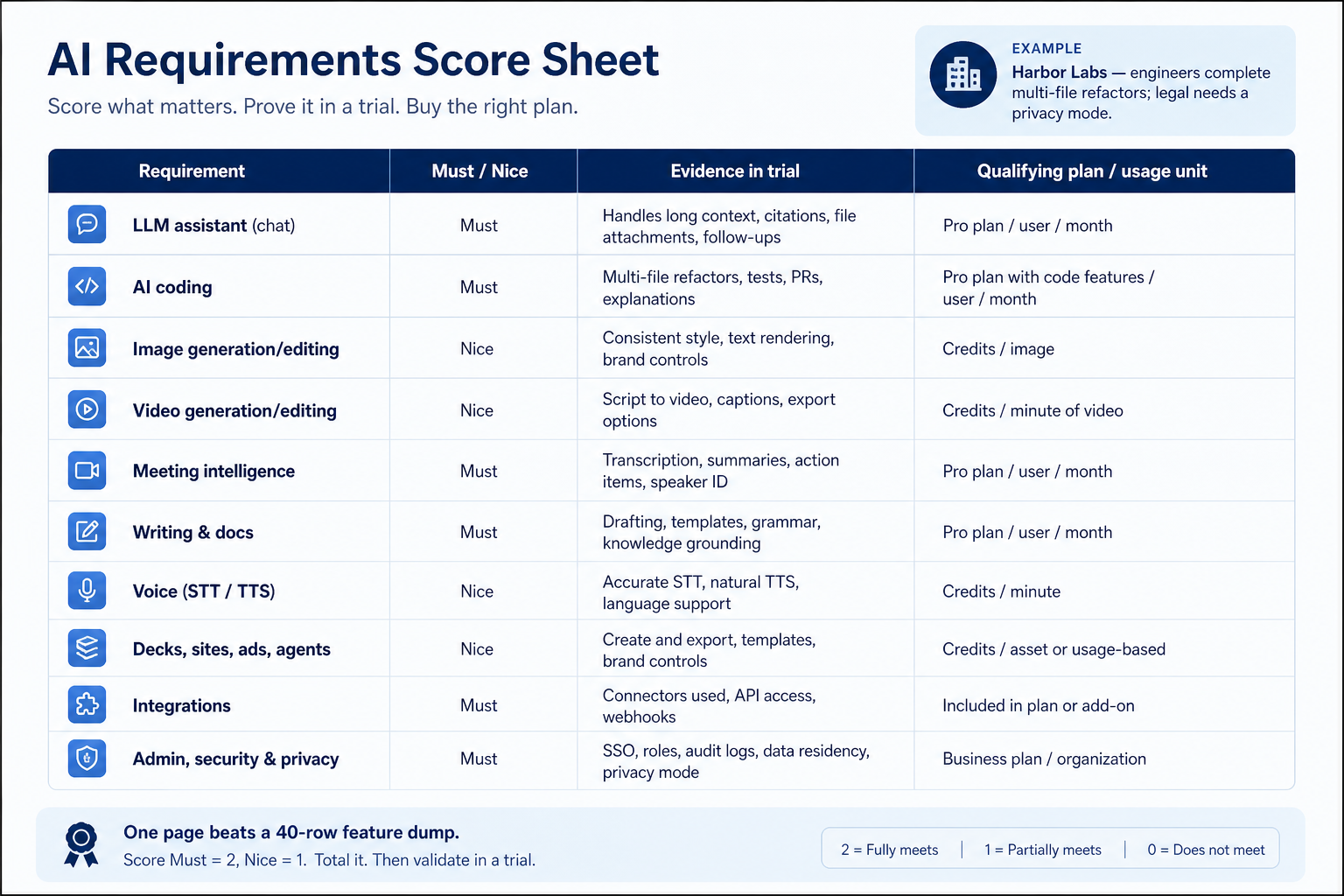
Columns: requirement, must/nice, evidence to collect in trial, qualifying plan/usage unit. Rows for LLM assistant, AI coding, image, video, meeting, writing, voice, presentations, website builder, ad creative, agents, integrations, admin.
This guide is the requirements surface for AI buyers on SoftwareGlimpse.
3. Split must-haves from nice-to-haves in writing
List day-one workflows for AI software in two columns: must work before go-live vs can wait until adoption proves out. Must-haves drive plan gates and integrations; nice-to-haves belong on a phase-two sheet so demos do not inflate scope.
Worked example: Harbor People Ops marks SSO and audit logs as must-have, AI summaries as phase-two. Demos that skip the must column get cut from the shortlist early.
4. Map integrations and data boundaries
Name systems that must sync or stay out of scope: identity, payroll, CRM, ecommerce, chat, or data warehouse. For each integration, note whether it is native, API, or manual export — and who owns the connection when it breaks.
Worked example: Northline Finance requires HRIS sync to payroll and refuses tools that need nightly CSV babysitting unless IT signs off.
5. Get a one-page sign-off before trials
Share the must-have sheet with finance, IT, and the team lead who owns the weekly job. Trials should test the signed sheet — not a fresh wishlist from each demo.
Next: /guides/how-to-choose-ai-software/
6. Use a one-page checklist before demos
For AI Software Requirements Guide, list must-haves, owners, integrations, and the weekly ritual this purchase must improve. Share the sheet with finance and IT before you schedule a second demo.
- Name the primary job in one sentence.
- List must-have gates (plans, SSO, data residency, usage caps).
- Name integrations that must work on day one.
- Assign an admin owner and a weekly user champion.
- Define non-admin proof — what a sceptic completes without rescue.
Worked example: Harbor Ops refuses demos until the checklist is signed — cutting evaluation time in half.
7. Avoid the usual buying mistakes
Common failures in ai: buying for brand familiarity, comparing entry tiles across different usage units, skipping a fair trial script, and adding scope before adoption proves out.
Run one trial script on every finalist the same week. Score on the same card. Write a one-paragraph decision memo that names what you are not buying yet.
8. Hand off to the category shortlist
When assumptions are frozen, continue on /best/ai-software/ with the same headcount, usage band, and must-have gates on every quote.
9. Use a one-page checklist before demos
For AI Software Requirements Guide, list must-haves, owners, integrations, and the weekly ritual this purchase must improve. Share the sheet with finance and IT before you schedule a second demo.
- Name the primary job in one sentence.
- List must-have gates (plans, SSO, data residency, usage caps).
- Name integrations that must work on day one.
- Assign an admin owner and a weekly user champion.
- Define non-admin proof — what a sceptic completes without rescue.
Worked example: Harbor Ops refuses demos until the checklist is signed — cutting evaluation time in half.
10. Avoid the usual buying mistakes
Common failures in ai: buying for brand familiarity, comparing entry tiles across different usage units, skipping a fair trial script, and adding scope before adoption proves out.
Run one trial script on every finalist the same week. Score on the same card. Write a one-paragraph decision memo that names what you are not buying yet.
11. Hand off to the category shortlist
When assumptions are frozen, continue on /best/ai-software/ with the same headcount, usage band, and must-have gates on every quote.
Frequently asked questions
Should requirements include scores?
No invented product scores. Capture evidence against your jobs; use Best page methodology for cluster editor’s picks.
How many must-haves is too many?
If more than roughly eight items are must-haves, you are still in wishlist mode — force a ranking.
Was this article helpful?
Have more questions? Contact our support team.
Part of Software buying guides · What Is AI Software?
Related guides
Supporting reading in this topic — not a generic related-posts dump.
- Rank Prompt Plans: Seats, Credits, and Qualifying TiersChoose your Rank Prompt plan by mapping must-haves to qualifying tiers — seats, credits, usage packs, and add-ons — not homepage “from” tiles.
- Is AdCreative.ai Worth It? Fit Scenarios Before You BuyDecide if AdCreative.ai is worth it for your team — job-cluster fit, trial proof, and packaging — without invented ROI percentages.
- Is AI InteleKt Worth It? Fit Scenarios Before You BuyDecide if AI InteleKt is worth it for your team — job-cluster fit, trial proof, and packaging — without invented ROI percentages.
- Is Aira Worth It? Fit Scenarios Before You BuyDecide if Aira is worth it for your team — job-cluster fit, trial proof, and packaging — without invented ROI percentages.
- Is ElevenLabs Worth It? Fit Scenarios Before You BuyDecide if ElevenLabs is worth it for your team — job-cluster fit, trial proof, and packaging — without invented ROI percentages.
- AdCreative.ai Plans: Seats, Credits, and Qualifying TiersChoose your AdCreative.ai plan by mapping must-haves to qualifying tiers — seats, credits, usage packs, and add-ons — not homepage “from” tiles.
- AI InteleKt Plans: Seats, Credits, and Qualifying TiersChoose your AI InteleKt plan by mapping must-haves to qualifying tiers — seats, credits, usage packs, and add-ons — not homepage “from” tiles.
SoftwareGlimpse Updates
Want clearer software shortlists? Get buying guides and comparisons by email.
Newsletter coming soon.