SoftwareGlimpse
Project Management & Productivity Software

Hive Implementation: 30/60/90 Rollout That Sticks

Hive implementation guide: day-zero sequence, pilot rules, plan gates, and cutover checks from SoftwareGlimpse research — not generic CRM setup filler.

By Lee MeyeridricksUpdated Aug 18, 20264 min readFact-checked

Quick answer

Implement Hive by mapping current project-management workflows to Hive objects, confirming plan gates for premium capabilities, piloting one team, then cutting over integrations (Slack, Google Workspace, Microsoft Teams) after data checks.

  • Start with: task boards
  • Gate check: confirm paid unlocks before go-live
  • Integrate after: data quality pass on Slack

Hive rollout media

Official setup walkthroughs and product surfaces that matter while you roll out Hive — not a full product gallery.

Official Hive setup walkthrough

Vendor tutorial for onboarding and configuration. It is not a SoftwareGlimpse rollout plan — use this guide for judgment.

This video is hosted on YouTube

This content is hosted by YouTube. The player loads only after you allow marketing cookies.

Official vendor tutorial

How To Start Using Hive

How Hive presents the product in an official vendor video.

What this shows

  • Hive product surfaces as shown in the official vendor video
  • UI/workflow layout marketed by the vendor
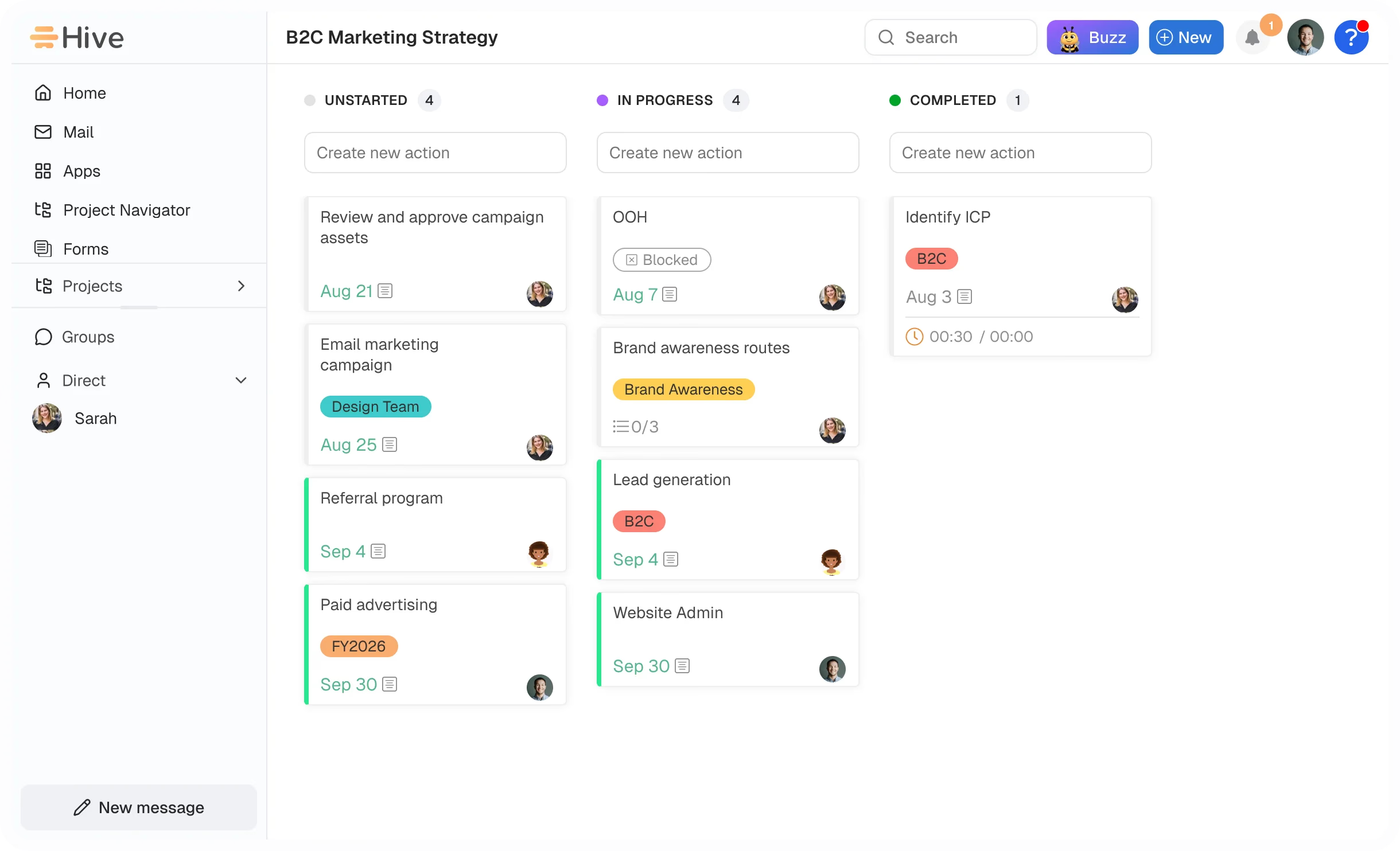
Product screenshots

Verified captures from Hive's product interface.

Hive workspace overview

Workspace overview from the official Hive homepage.

Full product screenshots and evidence live on the Hive research page.

Hive rollout rules

  • Job cluster first — Hive is collaborative project hub. Do not implement it as the heaviest enterprise work OS or a Gantt slide tool.
  • Adoption before add-ons — If Northline Ops will not open the product weekly, extra hubs will not save the rollout.
  • Integrations are a phase — Research names Slack, Google Workspace, Microsoft Teams, Salesforce, and Zapier on the Hive side — confirm the connectors your work loop depends on.
  • AI is optional — Research lists AI assistant, AI summaries, AI automation, and AI recommendations for Hive. Research places AI assistance on Free, Starter, Teams, and Enterprise.
  • Measure the ritual — Success is create one project, assign actions, and prove status is visible in chat or proofing without a side spreadsheet — not a kickoff deck.

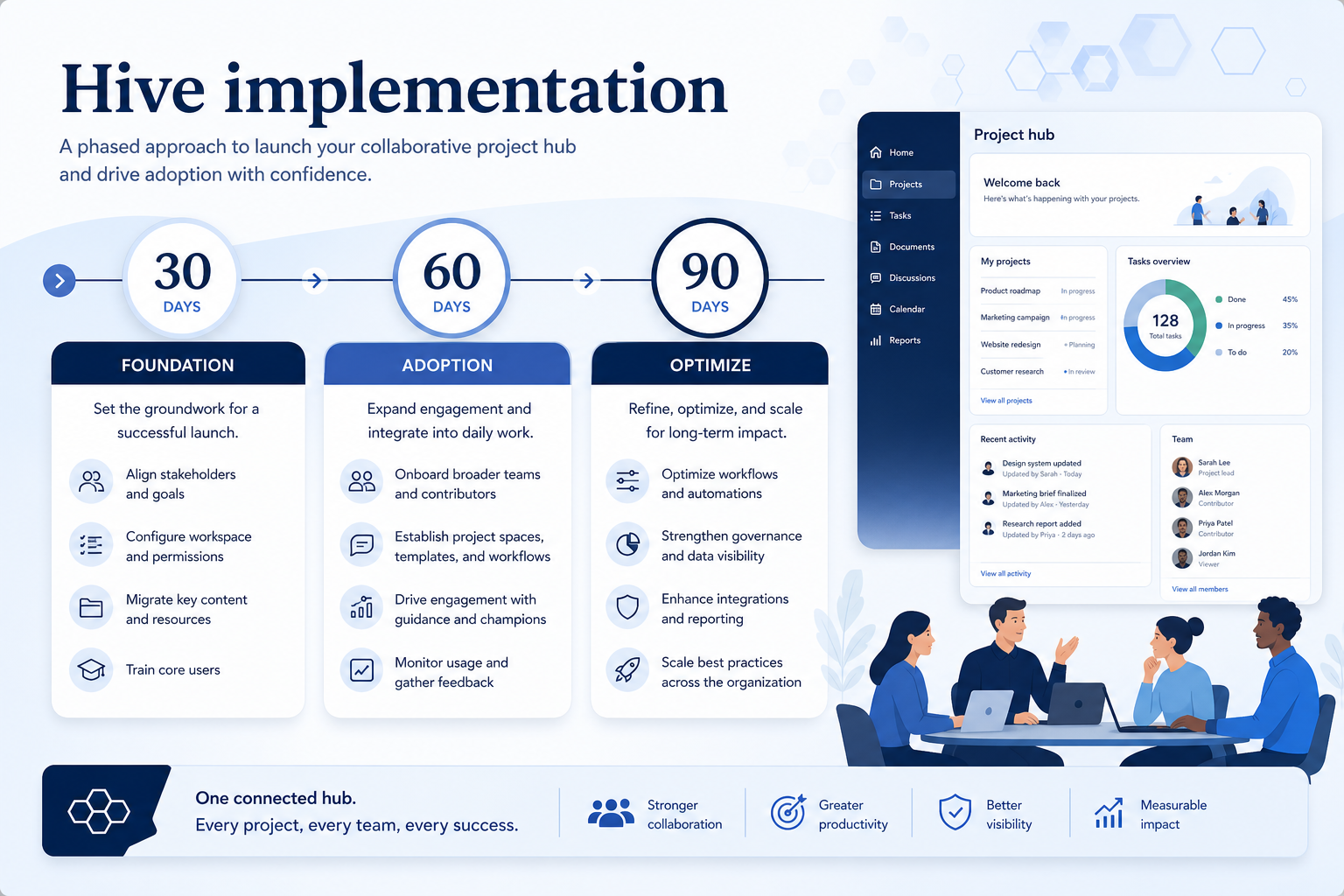
Hive 30/60/90

Hive 30/60/90 rollout for collaborative project hub.
Treat Hive implementation as gated phases — not a feature dump in week one.

Hive must vs nice

Must-have
  • Weekly update ritual
  • Sceptic user in training
  • Named admin hours
Nice-to-have
  • Automations and AI

Hive checklist

Bring these questions to every demo

Ask vendors to show the workflow live, not just describe it.

  • 1Freeze 90-day outcomesMust-haves and owners before configuration sprawl.
  • 2Name a workspace ownerBoards, users, and hygiene need a responsible party.
  • 3Schedule adoption reviewCheck core-loop usage before adding automations.

Frequently asked questions

  • How long should rollout take?

    Ninety days is enough for most SMB/mid teams if you freeze the job and defer extras. Longer programmes help when change management is the risk — not when the product is “complex.”

  • What if we also need a different work-management job?

    Buy the second job as a second product (or a later wave). Hive should not be stretched into the heaviest enterprise work OS or a Gantt slide tool.

  • When do automations belong?

    After four weeks of humans completing create one project, assign actions, and prove status is visible in chat or proofing without a side spreadsheet. Automating a dead board just creates faster garbage.

  • Do we need professional services?

    Only if you cannot name an internal owner. A partner cannot substitute for weekly users. Confirm any implementation fees on the pricing page — do not invent them here.

  • What if adoption is low at day 60?

    Do not buy more seats. Cut invited users to the people who must update Hive, fix permissions, and rerun non-admin proof.

1. Hive day-zero to steady-state sequence

  • Day zero — objects and owners

    Define owners for task boards, timeline / Gantt, workload and resources before inviting the whole org.

  • SMB pilot

    One pipeline / one team proves SMB and mid-market teams wanting Work OS depth with a lower paid entry than monday before company-wide seats.

  • Cutover

    Freeze legacy writes briefly; validate Slack and Google Workspace before reopen.

Treat Hive setup as a controlled rollout — not a weekend dump of CSV files.

Hive implementation go / no-go

  1. 1Go when plan unlocks cover must-have capabilities
  2. 2Pause if this limitation blocks ops: Free and Starter cap members/projects at 10 — growth forces Teams
  3. 3Do not expand seats until task boards is green

Hive implementation mistakes

  • Mistake 1

    Free and Starter cap members/projects at 10 — growth forces Teams

  • Mistake 2

    Free storage (200MB) and AI credits (1k) are tight for active teams

  • Mistake 3

    Flexible add-ons (~list price) can raise TCO beyond the Teams floor

  • Mistake 4

    Brand recognition trails monday.com for some buyers

  • Big-bang invite

    Inviting every user before object design creates junk data that is expensive to unwind.

Hive plan gates that affect rollout

Implementation fails when unlocks needed for go-live sit on a higher tier than budgeted.

  • Seats61%
  • Add-ons18%
  • Implementation12%
  • Training5%
  • Other4%
  • Free

    Free plan · Unlocks: task boards, timeline / Gantt, workload and resources · Suits: explore before committing seats

  • Starter

    14-day trial · Suits: teams whose must-have gates appear on this tier

  • Teams

    14-day trial · Suits: teams whose must-have gates appear on this tier

  • Enterprise

    Contact sales · Suits: teams that need custom procurement

Hive implementation checklist

0/3 dimensions noted — saved in this browser only.

  • Prep

  • Pilot

  • Scale

Was this article helpful?

Have more questions? Contact our support team.

SoftwareGlimpse Updates

Want clearer software shortlists? Get buying guides and comparisons by email.

Newsletter coming soon.