Types of Email Marketing Software
The product shapes inside email marketing software — pick the job first, then the vendor.
Quick answer
“Types of email marketing software” means different product shapes that share a category label but fail for different reasons. Decision rule: name the one job blocking work this quarter, then shortlist only tools whose core product is that shape.
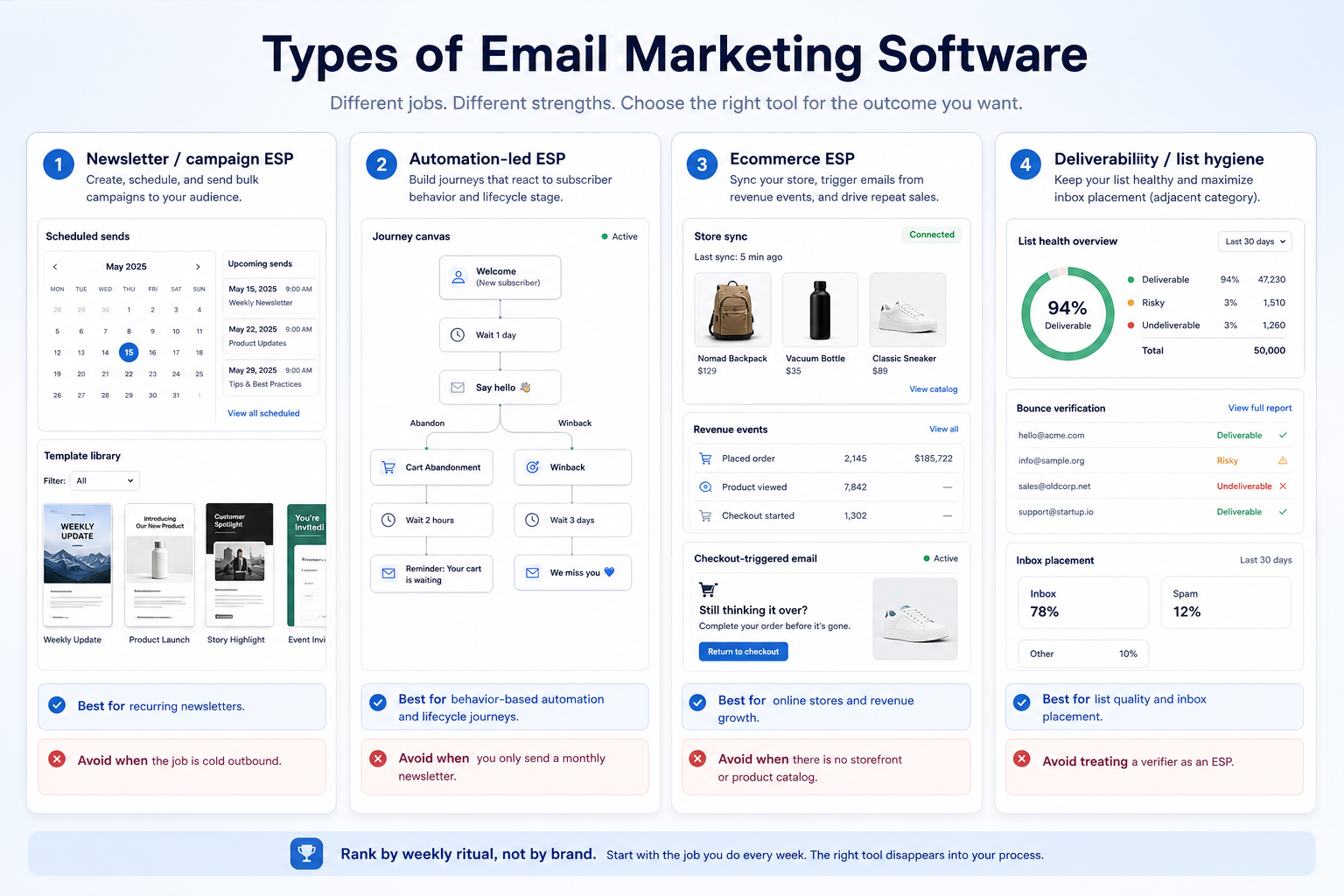
- Newsletter / campaign ESP
- Automation-led ESP
- Ecommerce ESP
- Deliverability / list hygiene (adjacent)
Key takeaways
- Shape before brand — A specialist that matches the job beats an all-in-one you will not run.
- Hybrids still need a primary job — Buying a bundle because it “does everything” usually means you under-test the one job you need.
- Catalogue examples are not rankings — Named products below are illustrations from the published SoftwareGlimpse catalogue — not a #1 list.
- Confirm live packaging — Plan gates and add-ons change which shape you can actually buy.
Modern email marketing software shapes (not rankings)
Newsletter / campaign ESP
Best for: Recurring newsletters and scheduled campaigns with templates.
Avoid when: The core job is multi-step behavioral journeys or cold outbound.
Automation-led ESP
Best for: Event-triggered journeys (welcome, abandon, winback) as the weekly product.
Avoid when: You only need a monthly newsletter and will not maintain workflows.
Ecommerce ESP
Best for: Store-synced catalogs, revenue events, and checkout-triggered email.
Avoid when: You have no storefront events and the job is B2B newslettering.
Deliverability / list hygiene (adjacent)
Best for: Verification and inbox placement as a supporting tool next to an ESP.
Avoid when: You treat a verifier as a substitute for campaigns and consent.
1. Pick a shape before a vendor demo
Example: Northline Goods (DTC accessories, three marketers) runs a Friday newsletter plus cart-abandon journeys. They capture signups on the store, segment by last purchase, and treat unsubscribes as a first-class list — not a CRM pipeline stage.
Catalogue illustrations (alphabetical, not a ranking): activecampaign, aweber, beehiiv, bouncer, brevo.
Common mistakes
One shortlist for unlike jobs
If products fail for different reasons, split the RFP.
Feature grids without a weekly outcome
If you cannot test it in two weeks, it is not a must-have.
2. Pick the shape that matches the blocking job
Common shapes in email marketing software:
- Newsletter / campaign ESP: best when Recurring newsletters and scheduled campaigns with templates. Avoid when The core job is multi-step behavioral journeys or cold outbound.
- Automation-led ESP: best when Event-triggered journeys (welcome, abandon, winback) as the weekly product. Avoid when You only need a monthly newsletter and will not maintain workflows.
- Ecommerce ESP: best when Store-synced catalogs, revenue events, and checkout-triggered email. Avoid when You have no storefront events and the job is B2B newslettering.
- Deliverability / list hygiene (adjacent): best when Verification and inbox placement as a supporting tool next to an ESP. Avoid when You treat a verifier as a substitute for campaigns and consent.
3. Prove the shape with one workflow
Run a single real workflow that only that shape should solve. If the workflow spans two shapes, split the purchase decision.
4. Use a one-page checklist before demos
For Types of Email Marketing Software, list must-haves, owners, integrations, and the weekly ritual this purchase must improve. Share the sheet with finance and IT before you schedule a second demo.
- Name the primary job in one sentence.
- List must-have gates (plans, SSO, data residency, usage caps).
- Name integrations that must work on day one.
- Assign an admin owner and a weekly user champion.
- Define non-admin proof — what a sceptic completes without rescue.
Worked example: Harbor Ops refuses demos until the checklist is signed — cutting evaluation time in half.
5. Avoid the usual buying mistakes
Common failures in email-marketing: buying for brand familiarity, comparing entry tiles across different usage units, skipping a fair trial script, and adding scope before adoption proves out.
Run one trial script on every finalist the same week. Score on the same card. Write a one-paragraph decision memo that names what you are not buying yet.
6. Hand off to the category shortlist
When assumptions are frozen, continue on /best/email-marketing-software/ with the same headcount, usage band, and must-have gates on every quote.
7. Use a one-page checklist before demos
For Types of Email Marketing Software, list must-haves, owners, integrations, and the weekly ritual this purchase must improve. Share the sheet with finance and IT before you schedule a second demo.
- Name the primary job in one sentence.
- List must-have gates (plans, SSO, data residency, usage caps).
- Name integrations that must work on day one.
- Assign an admin owner and a weekly user champion.
- Define non-admin proof — what a sceptic completes without rescue.
Worked example: Harbor Ops refuses demos until the checklist is signed — cutting evaluation time in half.
8. Avoid the usual buying mistakes
Common failures in email-marketing: buying for brand familiarity, comparing entry tiles across different usage units, skipping a fair trial script, and adding scope before adoption proves out.
Run one trial script on every finalist the same week. Score on the same card. Write a one-paragraph decision memo that names what you are not buying yet.
9. Hand off to the category shortlist
When assumptions are frozen, continue on /best/email-marketing-software/ with the same headcount, usage band, and must-have gates on every quote.
10. Use a one-page checklist before demos
For Types of Email Marketing Software, list must-haves, owners, integrations, and the weekly ritual this purchase must improve. Share the sheet with finance and IT before you schedule a second demo.
- Name the primary job in one sentence.
- List must-have gates (plans, SSO, data residency, usage caps).
- Name integrations that must work on day one.
- Assign an admin owner and a weekly user champion.
- Define non-admin proof — what a sceptic completes without rescue.
Worked example: Harbor Ops refuses demos until the checklist is signed — cutting evaluation time in half.
11. Avoid the usual buying mistakes
Common failures in email-marketing: buying for brand familiarity, comparing entry tiles across different usage units, skipping a fair trial script, and adding scope before adoption proves out.
Run one trial script on every finalist the same week. Score on the same card. Write a one-paragraph decision memo that names what you are not buying yet.
12. Hand off to the category shortlist
When assumptions are frozen, continue on /best/email-marketing-software/ with the same headcount, usage band, and must-have gates on every quote.
Frequently asked questions
Can one vendor cover every type?
Sometimes as adjacent modules — still score the primary job. Do not invent a universal winner.
Where are editor’s picks?
Best email marketing software groups products by job cluster with disclosed methodology.
Was this article helpful?
Have more questions? Contact our support team.
Part of Software buying guides · What Is Email Marketing Software? Beginner’s Guide
Related guides
Supporting reading in this topic — not a generic related-posts dump.
- Is Kit Worth It? Fit Scenarios Before You BuyDecide if Kit is worth it for your marketing team — fit scenarios, contact economics, and when to keep looking — without invented ROI percentages.
- Is AWeber Worth It? Fit Scenarios Before You BuyDecide if AWeber is worth it for your marketing team — fit scenarios, contact economics, and when to keep looking — without invented ROI percentages.
- Is Bouncer Worth It? Fit Scenarios Before You BuyDecide if Bouncer is worth it for your marketing team — fit scenarios, contact economics, and when to keep looking — without invented ROI percentages.
- Is InboxAlly Worth It? Fit Scenarios Before You BuyDecide if InboxAlly is worth it for your marketing team — fit scenarios, contact economics, and when to keep looking — without invented ROI percentages.
- ActiveCampaign Plans: Contacts, Sends, and Qualifying TiersChoose your ActiveCampaign plan by mapping must-haves to contact tiers, send limits, and qualifying features — not homepage “from” tiles — then confirm on the pricing page.
- Email Marketing Software vs CRMEmail marketing software sends permission-based campaigns to subscribers. A CRM is the sales system of record for people, companies, deals, and activity history.
- GetResponse Plans: Contacts, Sends, and Qualifying TiersChoose your GetResponse plan by mapping must-haves to contact tiers, send limits, and qualifying features — not homepage “from” tiles — then confirm on the pricing page.
Related products
Related comparisons
- Beehiiv vs Omnisendbeehiiv vs omnisend — product-context comparison for /guides/types-of-email-marketing/
- Beehiiv vs Dripbeehiiv vs drip — product-context comparison for /guides/types-of-email-marketing/
- Beehiiv vs Klaviyobeehiiv vs klaviyo — product-context comparison for /guides/types-of-email-marketing/
- Beehiiv vs Constant Contactbeehiiv vs constant-contact — product-context comparison for /guides/types-of-email-marketing/
SoftwareGlimpse Updates
Want clearer software shortlists? Get buying guides and comparisons by email.
Newsletter coming soon.