SoftwareGlimpse
Project Management & Productivity Software

Is Notion Worth It? Fit Scenarios Before You Buy

Decide if Notion is worth it for your team — job-cluster fit, trial proof, and packaging — without invented ROI percentages.

By Lee M.Updated Aug 18, 202610 min readFact-checked

Quick answer

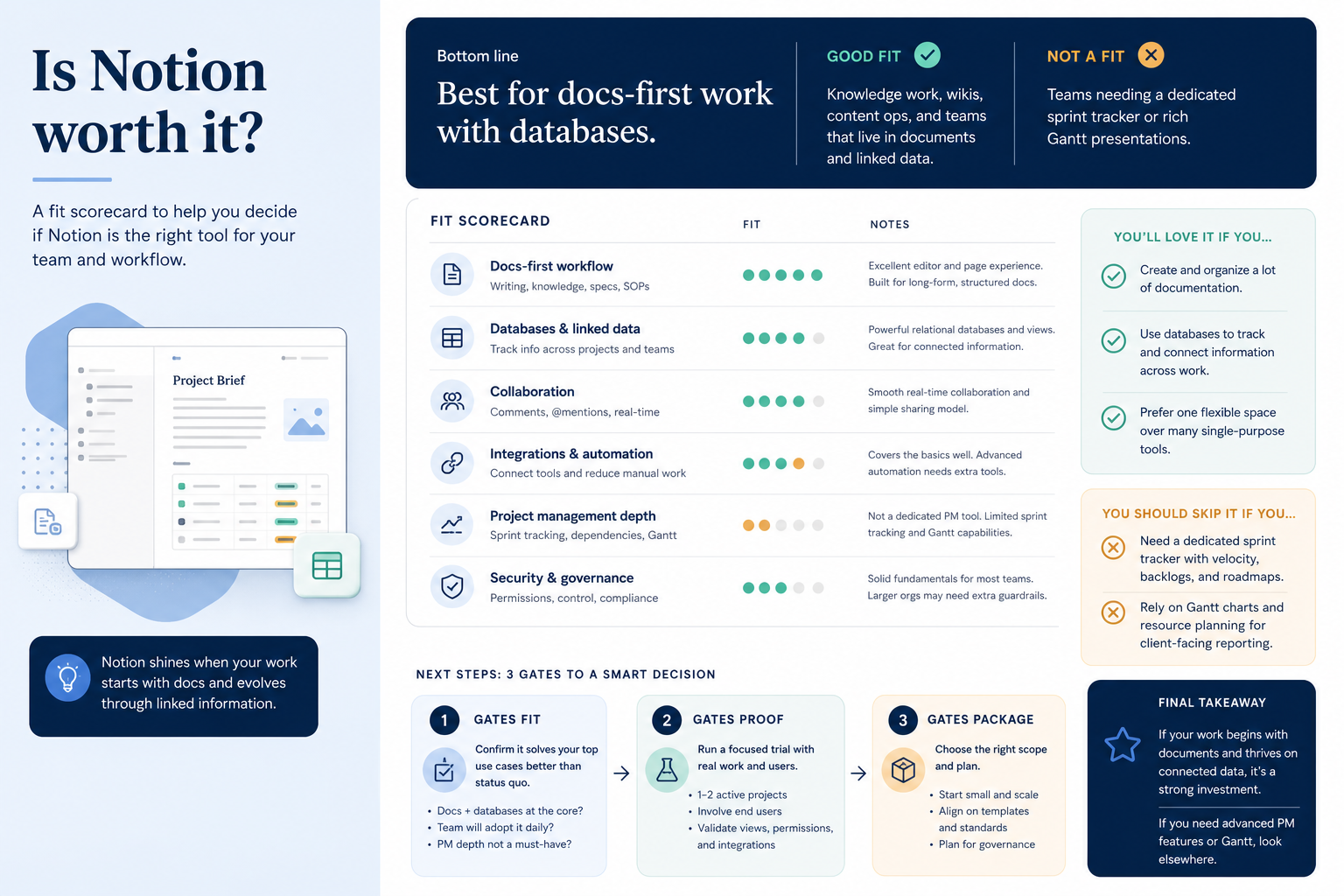
Notion is worth it when your primary job is docs-first workspace with databases, a non-admin can a non-admin updates a row and a manager opens the same view without a workspace owner on the package you will buy, and you can live with the researched tradeoffs. It is not worth stretching into a dedicated sprint tracker or a Gantt presenter. Confirm AI assistance (Free+) is on the package you will actually buy. If fit, proof, or packaging fails, keep looking — do not invent ROI to justify a shaky buy.

  • Fit the job cluster
  • Prove the core loop with a non-admin
  • Accept tradeoffs in writing
  • Confirm the qualifying package
  • Name an admin with weekly hours
  • Otherwise keep looking
Goals
Features
Integrations
Cost
Ease of use
Growth

See Notion before you decide

Core product overview media for a fit check — still not a substitute for the decision criteria on this page.

See Notion in action

Official product overview for a fit check — not scoring, pricing, or comparative superiority.

This video is hosted on YouTube

This content is hosted by YouTube. The player loads only after you allow marketing cookies.

Official vendor tutorial

Notion Training: The Basics

How Notion presents the product in an official vendor video.

What this shows

  • Notion product surfaces as shown in the official vendor video
  • UI/workflow layout marketed by the vendor
Product screenshots

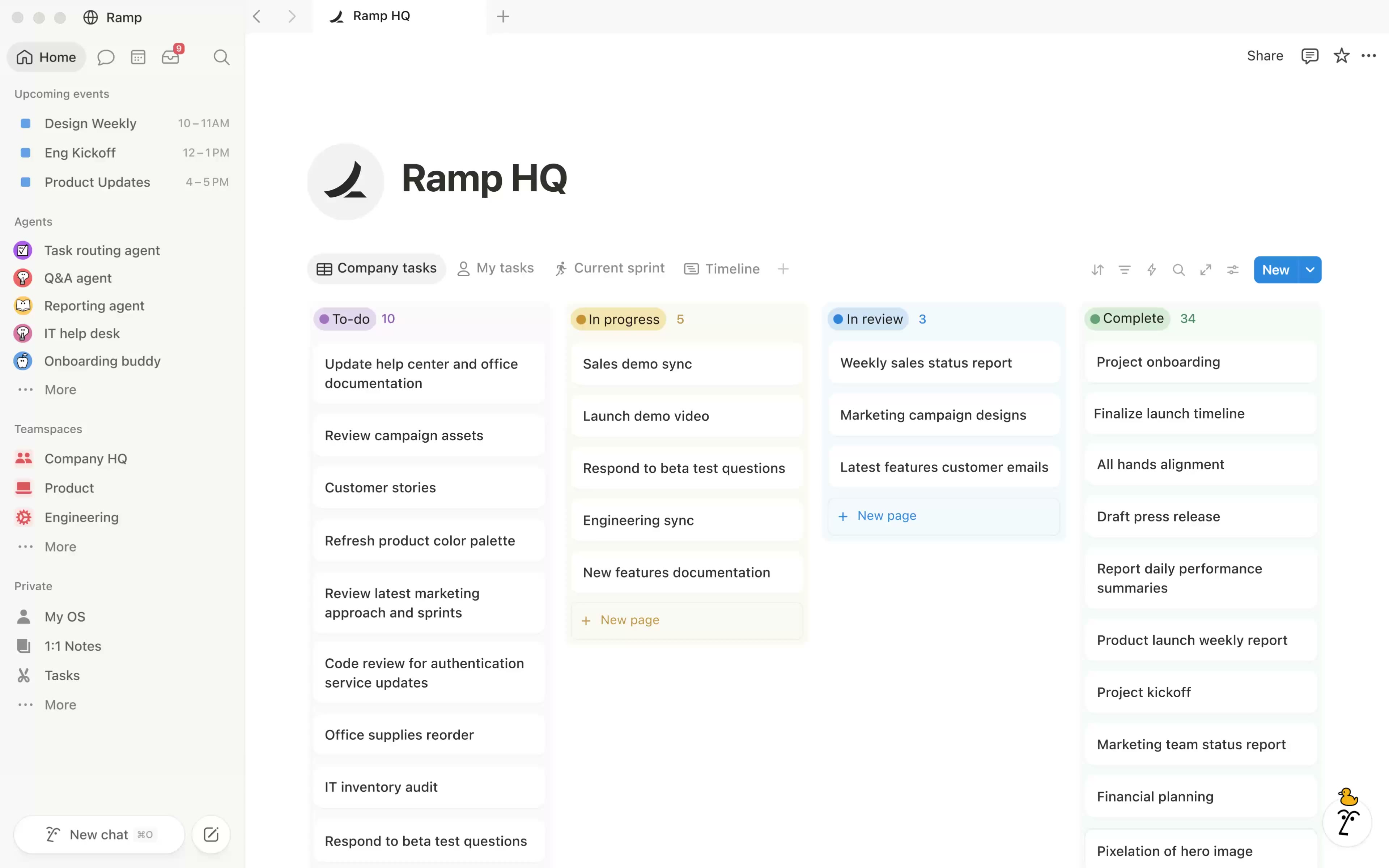
Verified captures from Notion's product interface.

Notion homepage workspace

Workspace hero UI from the official Notion homepage.

Official Notion marketing UI asset

https://www.notion.com/ · Checked 2026-08-18

Full product screenshots and evidence live on the Notion research page.

Is Notion worth it?

  • What it is Notion is a docs-first knowledge and database workspace used for wikis, specs and lightweight project tracking. Free for personal use; Plus ~list price annual; Business ~list price with Notion AI bundled in common 2026 packaging; Enterprise custom. Strong for…
  • Fit Best for: Docs-first teams and wikis; Startups combining specs + light tasks; Buyers who want Notion AI writing/search. Not ideal: Heavy portfolio/resource PM (monday/Wrike); Eng sprint orgs (Jira/Linear); Buyers needing native Gantt/workload depth.
  • Proof Worth it only when Northline Ops (docs-heavy team that also tracks work) can a non-admin updates a row and a manager opens the same view without a workspace owner.
  • Package Plan-gated in research: AI assistance (Free, Plus, Business, Enterprise).
  • No invented ROI Outcomes, usability, and qualifying cost either align or they don’t — affiliate economics are not a score.
  • Editorial verdict snapshot Notion: Choose Notion when documentation and flexible databases are the primary job, with light project tracking layered on — not as a pure Work OS substitute. Scores use the project-management editorial methodology from first-party research as of 2026-08-17 — not hands-on product testing.

Notion worth-it gates

  1. 1Job cluster
  2. 2Non-admin loop
  3. 3Accept?
  4. 4Qualifying hub
  5. 5Buy/pass

Notion fit / proof / package

Notion worth-it gates: fit, proof, package.
Notion is “worth it” when outcomes, usability, and qualifying cost align — not when a demo feels exciting.

Notion fit checklist

0/4 dimensions noted — saved in this browser only.

  • Primary job

  • Who updates weekly

  • Workspace owner

  • Visibility need

Do not buy the wrong work-management cluster

  • Work OS / collaborative projects

    Best for: Shared ownership, boards or action cards, manager visibility across functions.

    Avoid when: You actually need an engineering tracker, a Gantt slide, or a PDF editor.

  • Engineering issue tracking

    Best for: Issues, sprints/cycles, developer boards, release comments.

    Avoid when: Marketing campaigns and client proofing are the real job.

  • Spreadsheet PMO

    Best for: Dependencies, reports, and stakeholders who think in grids.

    Avoid when: You wanted a lightweight personal to-do list.

  • Docs + databases

    Best for: Project docs linked to task databases.

    Avoid when: You need a dedicated sprint tracker or Gantt presenter.

Notion must vs nice

Must-have
  • Job-cluster fit
  • Non-admin loop
  • Qualifying package
Nice-to-have
  • Demo excitement / brand preference

When Notion is the right size of tool

  1. 01

    Likely worth evaluating

    Your motion looks like docs-first workspace with databases and someone will admin Notion weekly.

    • Docs-first teams and wikis; Startups combining specs + light tasks; Buyers who want Notion AI writing/search
  2. 02

    Borderline — trial hard

    Needs are real but admin capacity is thin, or one must-have sits on a higher hub.

    • Set a decide-by date
    • Prove the loop on the qualifying package
  3. 03

    Usually not worth it

    The blocking job is a dedicated sprint tracker or a Gantt presenter, or nobody will update the board.

    • Heavy portfolio/resource PM (monday/Wrike); Eng sprint orgs (Jira/Linear); Buyers needing native Gantt/workload depth

Notion connectors to verify in trial

Research names Slack, Github, Figma, and Zapier on the Notion side — confirm the connectors your work loop depends on.

  • Slack
  • Github
  • Figma
  • Zapier

Verify each workflow in a trial — marketplace logos are not proof of fit.

How to judge Notion against peers

  • Job-cluster match

    Does the product’s primary job match docs-first workspace with databases?

    Weight 5
  • Non-admin loop

    a non-admin updates a row and a manager opens the same view without a workspace owner

    Weight 5
  • Manager visibility

    A lead can see status without a screenshot or side sheet.

    Weight 4
  • Qualifying packaging

    Must-haves on a real tier; guests/seats understood.

    Weight 4
  • Admin load

    Someone has weekly hours; hygiene is possible.

    Weight 3

Notion evaluation scorecard (no invented scores)

Weight the criteria; fill scores from your trial — SoftwareGlimpse does not invent a numeric ROI or a “worth it %.”

Criterion (weight)NotionClickUpAsana
Job-cluster fit ×5
Non-admin proof ×5
Qualifying package ×4
Admin capacity ×3
Accepted tradeoffs ×3
Weighted fit %0%0%0%

Scores are yours — not SoftwareGlimpse rankings. Affiliate status never changes this scorecard.

If fit fails, compare inside the same cluster

Do not rank Notion against a PDF editor or a remote-desktop tool. Stay in the same job cluster.

  • ClickUp logo
    ClickUp

    All-in-one configurable Work OS (tasks, docs, dashboards, ClickUp Brain) — Unlimited from $7/user/mo annual.

    View CRM profile
  • Asana logo
    Asana

    Cross-functional work management with goals, workflows and AI Studio — Starter from $10.99/user/mo annual.

    View CRM profile
  • Airtable logo
    Airtable

    Flexible database / app platform with interfaces and light project apps — Team from ~$20/user/mo annual.

    View CRM profile
  • monday.com logo
    monday.com

    Work OS / work management platform with boards, timelines, automations and AI credits — Basic from $9/seat/mo annual (3-seat minimum).

    View CRM profile

Shortlist is cluster-matched from the catalogue — not an affiliate-ordered ranking and not a score.

Notion checklist

Bring these questions to every demo

Ask vendors to show the workflow live, not just describe it.

  • 1Match best-for scenariosYour motion should be docs-first workspace with databases.
  • 2Prove the work loopa non-admin updates a row and a manager opens the same view without a workspace owner
  • 3Confirm seats and hubsMust-haves on a real tier before you call it a bargain.
  • 4Write buy · extend · passOne page, named reasons, no invented ROI.

1. Fit gate: does your motion match this job cluster?

Notion worth-it diagram 1.
Fit Notion to docs-first workspace with databases before you talk ROI.
  • Strong fit

    Motion matches best-for; admin named; contributors will live in it.

  • Borderline

    Needs are real but admin capacity is thin — trial hard, set a decide-by date.

  • Poor fit

    Poor-fit patterns dominate — compare Asana and ClickUp inside the same cluster.

Answer yes or no. Four or more “no” answers means Notion is the wrong tool right now. 1. Is your primary job docs-first workspace with databases — not a dedicated sprint tracker or a Gantt presenter?

  1. Best for: Docs-first teams and wikis; Startups combining specs + light tasks; Buyers who want Notion AI writing/search.
  2. Not ideal: Heavy portfolio/resource PM (monday/Wrike); Eng sprint orgs (Jira/Linear); Buyers needing native Gantt/workload depth.
  3. Will named contributors update Notion weekly?
  4. Is there an admin with ~2 hours a week? Worked example: Northline Ops (docs-heavy team that also tracks work) scores Notion on docs-first workspace with databases only — they refuse to treat it as a dedicated sprint tracker or a Gantt presenter. A polished demo does not change the score.

2. Proof gate: scripted non-admin loop — not a guided demo

Notion worth-it diagram 2.
Notion is worth it only when your team can run the loop.
  • Trial pass

    Non-admin loop works; manager visibility works.

  • Trial ambiguous

    Extend once with one written question that would close it.

  • Trial fail

    Contributors need babysitting for basic updates — that does not improve after purchase.

Our snapshot flags a trial on Plus and Business without a published length — confirm the window on the Notion pricing page. Success: a non-admin updates a row and a manager opens the same view without a workspace owner. 1. Use real work, not sample data.

  1. Give the loop to the least enthusiastic contributor.
  2. A manager must see the result without an admin screenshot.
  3. Break something on purpose (reassign, filter, export) and time the recovery. Worked example: Northline Ops (docs-heavy team that also tracks work) fails the gate when only an admin can complete the walkthrough; they extend trial and fix permissions before considering buy.

Notion evaluation script

  1. Day 1: Honest workspace

    • Confirm which Notion package the trial tenant is on
    • Stand up one teamspace, one project database, and a template people will duplicate
    • Invite only weekly users plus one sceptic
  2. Day 3: Non-admin loop

    • a non-admin updates a row and a manager opens the same view without a workspace owner
    • Manager finds status without a screenshot
    • Write down every question asked
  3. Day 7: Weekly ritual

    • Run one status review entirely in Notion
    • Reassign an owner and check history
    • Test: task boards, timeline / Gantt, automations and workflows, and docs and collaboration
  4. Day 14: Decide

    • Score fit, proof, package, admin capacity
    • Confirm qualifying plan on /pricing/notion/
    • Write buy, extend (one condition), or pass

3. Tradeoff gate: label every watch-out

Notion worth-it diagram 3.
Accept Notion tradeoffs in writing — or keep looking.
  • Acceptable

    You can name why it does not hit your three outcomes.

  • Mitigable

    Owner, cost, and date attached — or it is not a mitigation.

  • Disqualifying

    It blocks the job — compare peers in the same cluster.

Strengths: Best-in-class docs + databases; Notion AI on Business; Flexible templates; Strong SMB/saas adoption. Watch-outs: Weaker classic PM planning/reporting; Can become a messy wiki without standards; Not a Work OS peer on undifferentiated ranks; AI tied to higher plans. 1. Sort each watch-out: acceptable · mitigable (named owner + date) · disqualifying.

  1. Treat strengths as trial claims, not facts.
  2. If a disqualifier appears in trial, stop. Worked example: Northline Ops (docs-heavy team that also tracks work) documents known gaps instead of pretending Notion covers every work-management job.

4. Package gate and write buy · extend · pass

Notion worth-it diagram 4.
Buy Notion only when fit, proof, and package gates agree.
  • Buy

    Fit, proof, package, and admin hours all written.

  • Extend

    One closing question and a date — not an open-ended demo.

  • Pass

    Wrong cluster or failed proof — that is a successful evaluation.

  1. Confirm must-haves on a qualifying package. Plan-gated in research: AI assistance (Free, Plus, Business, Enterprise).
  2. Never invent list prices here — confirm seats, hubs, and quote terms on /pricing/notion/.
  3. Name the admin and weekly hours.
  4. Buy only when fit + proof + package all say yes.
  5. Otherwise keep looking via how to choose project management software — teams often also evaluate Asana, ClickUp, and Airtable. Worked example: Northline Ops (docs-heavy team that also tracks work) clears fit and proof but pauses the buy until hub/seat rules are written. They do not invent an ROI percentage to unblock procurement.

Ways teams wrongly decide Notion is “worth it”

  • Inventing ROI in a spreadsheet

    SoftwareGlimpse does not publish a worth-it percentage. If fit, proof, or package fails, the honest answer is no.

  • Buying from a demo high

    Demos are run by people who live in the product. Your sceptic contributor is the test.

  • Stretching the job cluster

    Notion as a dedicated sprint tracker or a Gantt presenter is how you end up with a second tool and a messy workspace.

  • Confusing sibling products

    Do not assume a similarly named Notion SKU is the same job cluster.

  • Skipping the qualifying hub

    If the loop only works on a plan you will not buy, it is not worth it at the tile you liked.

Commercial clarity without invented totals

Worth-it includes cost you can actually qualify. Confirm numbers on the pricing page.

  • Seats61%
  • Add-ons18%
  • Implementation12%
  • Training5%
  • Other4%
  • Qualifying seats

    Weekly updaters only.

  • Guests / viewers

    Confirm whether they bill as seats.

  • Hubs that unlock the loop

    Plan-gated in research: AI assistance (Free, Plus, Business, Enterprise).

  • Admin time

    ~2 hours/week is a real cost even when it is not on the invoice.

Open Notion pricing →

Frequently asked questions

  • Can we decide from a demo alone?

    No. Require non-admin proof that you can a non-admin updates a row and a manager opens the same view without a workspace owner on the package you will actually buy.

  • Does SoftwareGlimpse invent a score here?

    No. This page is a qualitative gate (fit, proof, package). Criterion scores live on the product review. We do not invent ROI percentages or affiliate-ordered rankings.

  • Is monday sales CRM the same product?

    Notion is evaluated here as docs-first workspace with databases only. Check the product hub if a sibling SKU exists.

  • When should we walk away?

    When fit, trial proof, or written packaging fails — or when the real job is a dedicated sprint tracker or a Gantt presenter. Walking away is a successful evaluation.

  • What if leadership already picked it?

    Still run the gates. A pre-chosen tool that fails non-admin proof becomes a status-meeting tax. Put the failed gate in writing.

  • How do we compare alternatives?

    Use how to choose project management software and stay inside the same job cluster. Teams often also evaluate Asana, ClickUp, and Airtable. Do not rank a work OS against a PDF editor.

Was this article helpful?

Have more questions? Contact our support team.

SoftwareGlimpse Updates

Want clearer software shortlists? Get buying guides and comparisons by email.

Newsletter coming soon.