SoftwareGlimpse
AI Software

Is Otter.ai Worth It? Fit Scenarios Before You Buy

Decide if Otter.ai is worth it for your team — job-cluster fit, trial proof, and packaging — without invented ROI percentages.

By Lee M.Updated Aug 18, 20266 min readFact-checked

Quick answer

Otter.ai is worth it when your primary job is AI meeting notes and transcription, a non-admin can finish a meeting with searchable notes a manager can open without Otter admin help on the package you will buy, and you can live with the researched tradeoffs. It is not worth stretching into ChatGPT as a general chatbot or Microsoft 365 Copilot as a full workspace LLM.

  • Fit the job cluster
  • Prove the core loop
  • Accept tradeoffs in writing
  • Confirm the qualifying package
  • Otherwise keep looking
Goals
Features
Integrations
Cost
Ease of use
Growth

See Otter.ai before you decide

Core product overview media for a fit check — still not a substitute for the decision criteria on this page.

See Otter.ai in action

Official product overview for a fit check — not scoring, pricing, or comparative superiority.

This video is hosted on YouTube

This content is hosted by YouTube. The player loads only after you allow marketing cookies.

Official vendor video

Otter: An Enterprise Essential

What this shows

  • Otter.ai enterprise meeting transcription overview
  • Official Otter product positioning for teams
Product screenshots

Verified captures from Otter.ai's product interface.

Otter.ai desktop app product UI

Official Otter desktop-app marketing UI from otter.ai — not a SoftwareGlimpse lab screenshot.

Official Otter.ai marketing UI asset (overview alias)

https://otter.ai/ · Checked 2026-08-18

Full product screenshots and evidence live on the Otter.ai research page.

Is Otter.ai worth it?

  • Fit Best for: Individuals drowning in meeting notes; Sales and CS teams that want auto-join transcripts; SMBs that need Business admin without an enterprise RFP. Not ideal: Buyers who need a general LLM (ChatGPT); Voice production (ElevenLabs); Coding (Cursor / GitHub Copilot).
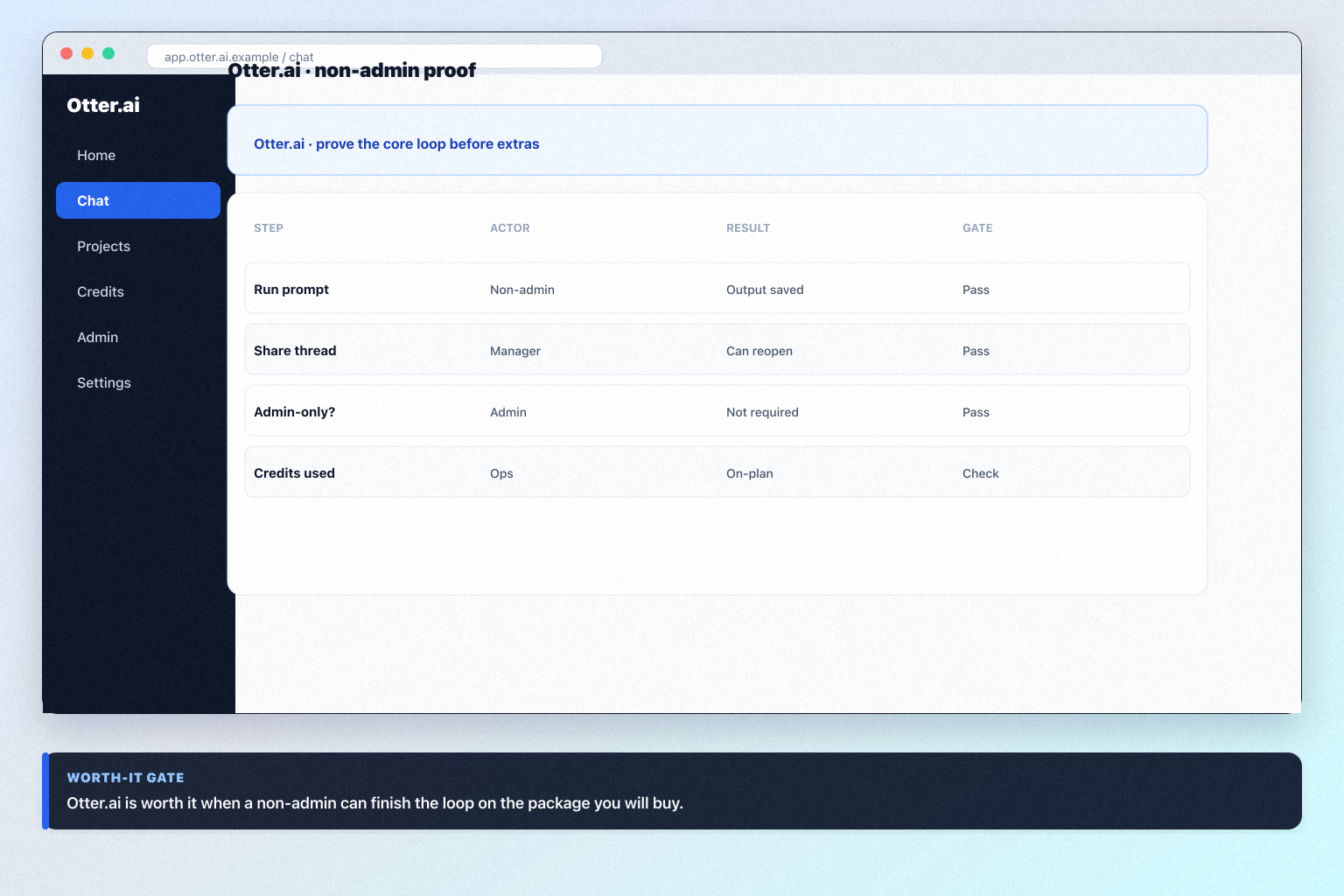
  • Proof Worth it only when Harbor Sales (discovery calls) can finish a meeting with searchable notes a manager can open without Otter admin help.
  • Package Plan-gated in research: enterprise admin and SSO (Basic, Pro, Business, Enterprise); data privacy controls (Basic, Pro, Business, Enterprise).
  • No invented ROI Outcomes, usability, and qualifying cost either align or they don’t — affiliate economics are not a score.

Otter.ai fit / proof / package

Otter.ai worth-it gates: fit, proof, package.
Otter.ai is “worth it” when outcomes, usability, and qualifying cost align — not when a demo feels exciting.

1. Fit gate: does your motion match?

Compare your job to researched best-for / not-ideal patterns. Best for: Individuals drowning in meeting notes; Sales and CS teams that want auto-join transcripts; SMBs that need Business admin without an enterprise RFP. Not ideal: Buyers who need a general LLM (ChatGPT); Voice production (ElevenLabs); Coding (Cursor / GitHub Copilot). Worked example: Harbor Sales (discovery calls) scores Otter.ai on AI meeting notes and transcription only — they refuse to treat it as ChatGPT as a general chatbot or Microsoft 365 Copilot as a full workspace LLM.

2. Proof gate: non-admin loop

Our snapshot records no trial length for Otter.ai — ask for an evaluation window in writing before you commit seats. Success: finish a meeting with searchable notes a manager can open without Otter admin help. Worked example: Harbor Sales (discovery calls) fails the gate when only an admin can complete the walkthrough; they extend trial and fix permissions before considering buy.

3. Tradeoff gate: can you live with the limits?

Strengths: Real free tier; Low annual Pro floor; Auto-join Zoom/Meet/Teams; Summaries and action items. Watch-outs: Minute caps on lower plans; Not a general LLM; Enterprise features are quote-gated; Language/specialty transcription limits. Worked example: Harbor Sales (discovery calls) documents known gaps instead of pretending Otter.ai covers every AI job.

4. Package gate and decide

  1. Confirm must-haves on a qualifying package. Plan-gated in research: enterprise admin and SSO (Basic, Pro, Business, Enterprise); data privacy controls (Basic, Pro, Business, Enterprise).
  2. Never invent list prices here — confirm seats, credits, and quote terms on /pricing/otter-ai/.
  3. Buy only when fit + proof + package all say yes.
  4. Otherwise keep looking via how to choose AI software — teams often also evaluate Microsoft 365 Copilot and ChatGPT. Worked example: Harbor Sales (discovery calls) clears fit and proof but pauses the buy until hub/seat rules are written.

Otter.ai checklist

Bring these questions to every demo

Ask vendors to show the workflow live, not just describe it.

  • 1Match best-for scenariosYour motion should be AI meeting notes and transcription.
  • 2Prove the AI loopfinish a meeting with searchable notes a manager can open without Otter admin help
  • 3Confirm seats and creditsMust-haves on a real tier before you call it a bargain.

5. Decide if Otter.ai fits the primary job

Choose Otter.ai when AI meeting notes and auto-join transcription are the job — not a general LLM or voice studio.

6. Compare finalists in the same cluster

  • Strong fit

    Individuals drowning in meeting notes

  • Weak fit

    Buyers who need a general LLM (ChatGPT)

Peer alternatives to compare: Microsoft 365 Copilot and ChatGPT. Run the same trial script on each before you decide.

7. Write the decision in one paragraph

Name the job, the qualifying Otter.ai configuration, and what you are not buying yet. Link /software/otter-ai/ for product detail and /pricing/otter-ai/ for commercial assumptions.

8. Decide if Otter.ai fits the primary job

Choose Otter.ai when AI meeting notes and auto-join transcription are the job — not a general LLM or voice studio.

9. Compare finalists in the same cluster

  • Strong fit

    Individuals drowning in meeting notes

  • Weak fit

    Buyers who need a general LLM (ChatGPT)

Peer alternatives to compare: Microsoft 365 Copilot and ChatGPT. Run the same trial script on each before you decide.

10. Write the decision in one paragraph

Name the job, the qualifying Otter.ai configuration, and what you are not buying yet. Link /software/otter-ai/ for product detail and /pricing/otter-ai/ for commercial assumptions.

11. Decide if Otter.ai fits the primary job

Choose Otter.ai when AI meeting notes and auto-join transcription are the job — not a general LLM or voice studio.

12. Compare finalists in the same cluster

  • Strong fit

    Individuals drowning in meeting notes

  • Weak fit

    Buyers who need a general LLM (ChatGPT)

Peer alternatives to compare: Microsoft 365 Copilot and ChatGPT. Run the same trial script on each before you decide.

13. Write the decision in one paragraph

Name the job, the qualifying Otter.ai configuration, and what you are not buying yet. Link /software/otter-ai/ for product detail and /pricing/otter-ai/ for commercial assumptions.

Frequently asked questions

  • Can we decide from a demo alone?

    No. Require non-admin proof that you can finish a meeting with searchable notes a manager can open without Otter admin help on the package you will actually buy.

  • When should we walk away?

    When fit, trial proof, or written packaging fails — or when the real job is ChatGPT as a general chatbot or Microsoft 365 Copilot as a full workspace LLM.

Was this article helpful?

Have more questions? Contact our support team.

SoftwareGlimpse Updates

Want clearer software shortlists? Get buying guides and comparisons by email.

Newsletter coming soon.