Marketing Software Evaluation Guide
A practical evaluation script for social scheduling, funnels, MAP, listening, and webinar tools.
Quick answer
Evaluate marketing software with one shared script per job cluster: queue a week of posts with approvals, publish one funnel page, run a three-step journey, or triage a mention stream — on the qualifying plan. Decision rule: finalists only advance if the weekly ritual stays accurate after three days of real use.
- Shared trial script
- Qualifying plan only
- One real campaign
- Approvals / visibility check
- Integration smoke test
- Three-day accuracy check
Key takeaways
- Demos are not trials — Vendor tours skip plan gates and messy campaign data. Score the configuration you will buy.
- Accuracy beats beauty — A pretty calendar that still needs a side spreadsheet after three days fails the evaluation.
- Include a sceptic publisher — Adoption risk shows up when a reluctant social lead or demand-gen owner tries to ship without IT.
1. Run the same script on every finalist
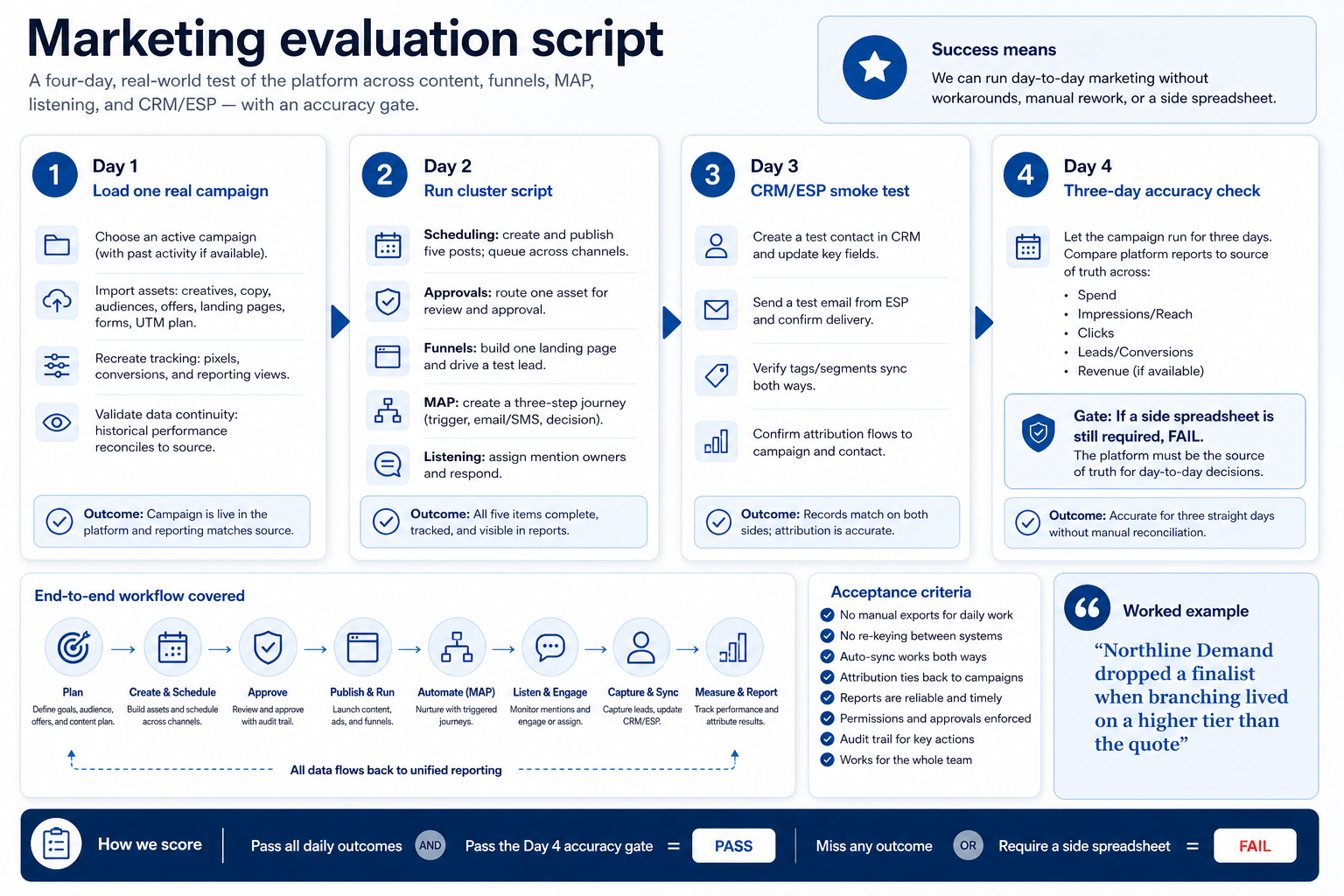
Pick one script for your cluster. Scheduling: queue five posts with one approval. Funnels: publish one page and capture a test lead. MAP: enroll a test person in a three-step journey. Listening: assign owners on a real mention stream for three days. Webinars: run a 20-minute test session with registration.
Worked example: Northline Demand eliminated a finalist when journey branching only worked on a higher tier than the quote assumed.
2. Decide with methodology, not affiliate pressure
Inside each job cluster, weigh ease of use, campaign/content, automation, funnel conversion, analytics/attribution, brand monitoring, integrations, scalability, value, and AI assistance — the SoftwareGlimpse marketing-editorial criteria. Do not reorder finalists by commission. Do not rank a scheduler against a listening suite.
3. Run one trial script on every finalist
Pick the workflow that blocked work last quarter. Run it on every shortlist tool the same week: same data shape, same users, same success criteria. Score completion, time-to-done, and where an admin had to rescue the task.
Worked example: Harbor Labs runs the same refactor ticket on three coding tools. Tool C fails SSO on the quoted tier and is dropped before a second meeting.
4. Score on one card the same day
Use the same rubric for every vendor: must-have gates, adoption risk, integration fit, and modeled total cost band. Record who attended and which plan tier was shown — demos often run above the tier you can afford.
5. Write a one-page decision memo
Name the primary job, the qualifying configuration, the winner, and what you are explicitly not buying yet. Link to pricing and requirements guides so finance can audit assumptions later.
Next: /guides/how-to-choose-marketing-software/
6. Use a one-page checklist before demos
For Marketing Software Evaluation Guide, list must-haves, owners, integrations, and the weekly ritual this purchase must improve. Share the sheet with finance and IT before you schedule a second demo.
- Name the primary job in one sentence.
- List must-have gates (plans, SSO, data residency, usage caps).
- Name integrations that must work on day one.
- Assign an admin owner and a weekly user champion.
- Define non-admin proof — what a sceptic completes without rescue.
Worked example: Harbor Ops refuses demos until the checklist is signed — cutting evaluation time in half.
7. Avoid the usual buying mistakes
Common failures in marketing: buying for brand familiarity, comparing entry tiles across different usage units, skipping a fair trial script, and adding scope before adoption proves out.
Run one trial script on every finalist the same week. Score on the same card. Write a one-paragraph decision memo that names what you are not buying yet.
8. Hand off to the category shortlist
When assumptions are frozen, continue on /best/marketing-software/ with the same headcount, usage band, and must-have gates on every quote.
9. Use a one-page checklist before demos
For Marketing Software Evaluation Guide, list must-haves, owners, integrations, and the weekly ritual this purchase must improve. Share the sheet with finance and IT before you schedule a second demo.
- Name the primary job in one sentence.
- List must-have gates (plans, SSO, data residency, usage caps).
- Name integrations that must work on day one.
- Assign an admin owner and a weekly user champion.
- Define non-admin proof — what a sceptic completes without rescue.
Worked example: Harbor Ops refuses demos until the checklist is signed — cutting evaluation time in half.
10. Avoid the usual buying mistakes
Common failures in marketing: buying for brand familiarity, comparing entry tiles across different usage units, skipping a fair trial script, and adding scope before adoption proves out.
Run one trial script on every finalist the same week. Score on the same card. Write a one-paragraph decision memo that names what you are not buying yet.
11. Hand off to the category shortlist
When assumptions are frozen, continue on /best/marketing-software/ with the same headcount, usage band, and must-have gates on every quote.
Frequently asked questions
How long should a trial last?
Two weeks is enough for most SMB/mid teams if you run a fixed script. Longer trials help when legal review or MAP data plumbing is the risk.
What if hands-on testing is not available?
SoftwareGlimpse disclosures note research-grounded editorial judgment when handsOnTesting is false — still demand a vendor trial for your own purchase decision.
Was this article helpful?
Have more questions? Contact our support team.
Part of Software buying guides · What Is Marketing Software?
Related guides
Supporting reading in this topic — not a generic related-posts dump.
- LucroVox Plans: Seats, Channels, and Qualifying TiersChoose your LucroVox plan by mapping must-haves to seats, channels, and qualifying features — not homepage “from” tiles — then confirm on the pricing page.
- Marketing Software Pricing GuideBudget schedulers, funnel builders, MAP platforms, listening tools, and webinars by qualifying configuration — not the advertised starter tile.
- Marketing Software Requirements GuideA practical requirements sheet for social scheduling, funnels, MAP, listening, and webinar purchases.
- Accelerated Growth Studio Plans: Seats, Channels, and Qualifying TiersChoose your Accelerated Growth Studio plan by mapping must-haves to seats, channels, and qualifying features — not homepage “from” tiles — then confirm on the pricing page.
- Evolve Plans: Seats, Channels, and Qualifying TiersChoose your Evolve plan by mapping must-haves to seats, channels, and qualifying features — not homepage “from” tiles — then confirm on the pricing page.
- Is Accelerated Growth Studio Worth It? Fit Scenarios Before You BuyDecide if Accelerated Growth Studio is worth it for your growth team — fit scenarios, packaging, and when to keep looking — without invented ROI percentages.
- Is Evolve Worth It? Fit Scenarios Before You Buyfr009-backfill:guide_overlay→injection
- Is LucroVox Worth It? Fit Scenarios Before You Buyfr009-backfill:guide_overlay→injection
SoftwareGlimpse Updates
Want clearer software shortlists? Get buying guides and comparisons by email.
Newsletter coming soon.