What Is Marketing Software?
A clear definition of social scheduling, funnels, MAP automation, listening, and webinars — and how they differ from email marketing ESPs.
Quick answer
Marketing software is several jobs — social publishing, landing pages and funnels, marketing automation / MAP, social listening, webinars, and specialist attribution or QR tooling — not one undifferentiated “best marketing stack.” Decision rule: name the weekly output first; if it is scheduled posts, buy a scheduler; if it is a funnel with checkout, buy a funnel builder; if it is lifecycle journeys across email/SMS/push, buy MAP-class automation; if it is media intelligence, buy listening — and treat email marketing ESPs as a related child category, not as social or funnel peers.
- Social scheduling
- Funnels / landing pages
- MAP / automation
- Social listening / PR intel
- Webinars / live video
- Not one ranked list
Key takeaways
- The category holds several jobs — Schedulers, funnel builders, MAP platforms, listening suites, and webinar tools fail for different reasons. Naming the job first prevents most bad shortlists.
- Email marketing is a sibling, not a substitute — ESPs send permission-based campaigns. MAP and funnel tools may include email, but Klaviyo-class ESPs belong on email-marketing pages — not as Hootsuite or ClickFunnels peers.
- Listening is not publishing — Brand24, Meltwater, and Brandwatch monitor mentions and media. Buffer and Hootsuite publish. Do not rank them as if they were the same product.
- Specialists are not weaker suites — Livestorm, WhatConverts, Uniqode, and Switcher Studio are cluster peers for webinars, call tracking, QR, and live video — not incomplete Marketo substitutes.
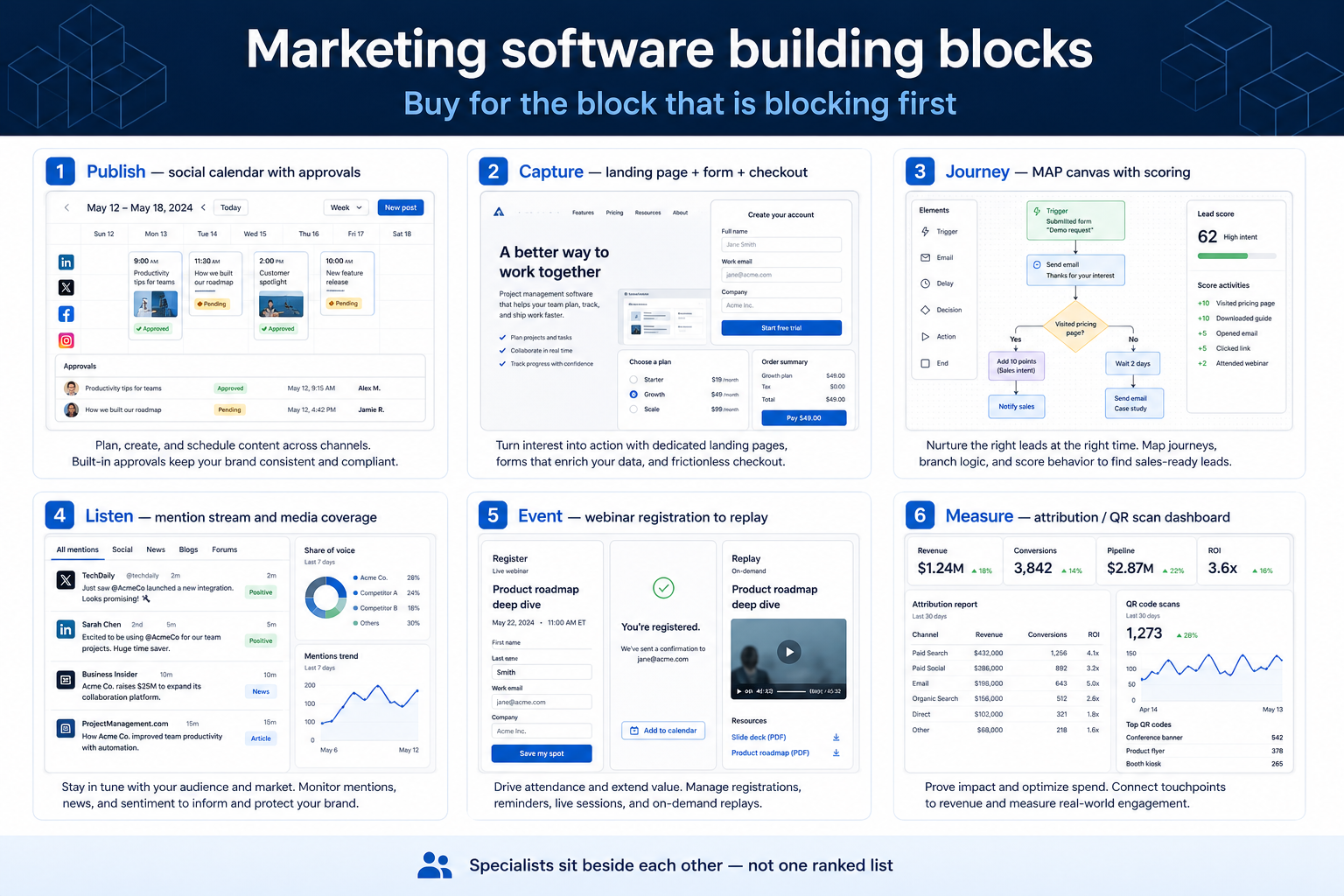
Marketing software building blocks
1. How does marketing software work?
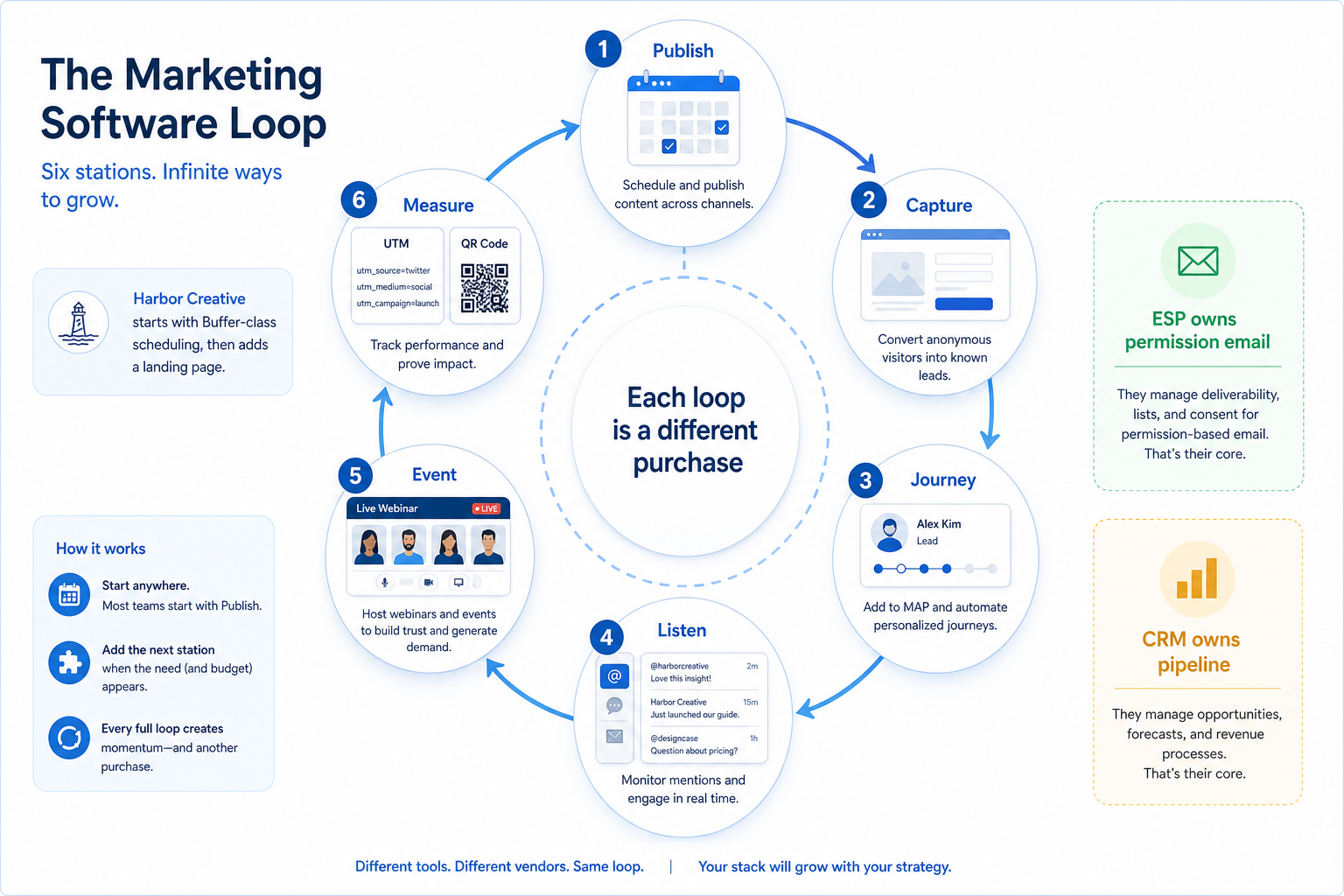
Publish
Posts go out on a calendar with channel-level reporting.
Capture
A landing page or funnel collects the week’s campaign leads.
Journey
Behavioural steps run without rebuilding the same nurture in a spreadsheet.
Listen
Mentions and coverage land in one inbox with owners.
Event
Registration, live session, and replay sit in one workflow.
Most marketing platforms specialise: schedulers queue and report posts; funnel builders host pages, checkouts, and sequences; MAP tools run multi-step journeys from a person or account record; listening tools ingest mentions and media; webinar products run registration-to-replay; attribution and QR tools connect ads or print to leads.
Example: Harbor Creative, an 11-person DTC brand, starts with Buffer for three social channels, then adds Leadpages when the weekly job is a campaign landing page — without buying Meltwater they do not need yet.
2. What marketing software typically includes
Depending on job cluster: content calendars and inbox replies; landing pages, checkouts, and memberships; journey canvases and lead scoring; mention streams and media databases; webinar rooms and email reminders; call tracking or QR codes.
Job clusters matter more than brand names: social suites, funnel builders, MAP platforms, listening, and event tools rarely belong on the same undifferentiated shortlist. Catalogue examples are shapes to compare by primary job — not a ranking.
Common marketing software shapes (not rankings)
Social scheduling
Best for: Teams that need calendars, approvals, and channel analytics without buying a listening suite.
Avoid when: The blocking job is media intelligence or a paid-ads command centre.
Funnels and landing pages
Best for: Campaign teams that need pages, forms, and checkout or membership flows in one builder.
Avoid when: You only need a scheduler, or you already own a full MAP and only need an ESP.
MAP / marketing automation
Best for: Lifecycle teams running multi-step journeys, scoring, and CRM sync at mid-market or enterprise scale.
Avoid when: You need a simple newsletter ESP or a three-page funnel with no person model.
Social listening / media intelligence
Best for: PR and brand teams who need mentions, coverage, and alerts — not a publisher.
Avoid when: The only job is scheduling posts this week.
3. Name the job marketing software should own
Marketing tools implement a campaign loop: plan, create, approve, publish (or launch a funnel), listen or triage replies, then measure. Schedulers, funnel builders, MAP, and listening suites each own different steps.
Example: Harbor Creative wrote “three social channels publish from one calendar this month.” That sentence ruled out listening-only suites before demos started.
4. Next: freeze requirements and compare fairly
Move to /guides/how-to-choose-marketing-software/ once the job cluster is clear. Compare finalists with the same assumptions — not affiliate-ordered lists.
5. Use a one-page checklist before demos
For What Is Marketing Software?, list must-haves, owners, integrations, and the weekly ritual this purchase must improve. Share the sheet with finance and IT before you schedule a second demo.
- Name the primary job in one sentence.
- List must-have gates (plans, SSO, data residency, usage caps).
- Name integrations that must work on day one.
- Assign an admin owner and a weekly user champion.
- Define non-admin proof — what a sceptic completes without rescue.
Worked example: Harbor Ops refuses demos until the checklist is signed — cutting evaluation time in half.
6. Avoid the usual buying mistakes
Common failures in marketing: buying for brand familiarity, comparing entry tiles across different usage units, skipping a fair trial script, and adding scope before adoption proves out.
Run one trial script on every finalist the same week. Score on the same card. Write a one-paragraph decision memo that names what you are not buying yet.
7. Hand off to the category shortlist
When assumptions are frozen, continue on /best/marketing-software/ with the same headcount, usage band, and must-have gates on every quote.
Frequently asked questions
Is marketing software the same as email marketing?
No. Email marketing (ESP) is a child category for permission-based campaigns. Marketing software here covers social, funnels, MAP, listening, and events. Compare ESPs on email-marketing pages.
Do I need one suite or specialist tools?
Buy for the job that creates the most rework this quarter. Suites help when several blocks must live together; specialists win when publishing, listening, or webinars is the only gap.
Where do Buffer, ClickFunnels, Marketo, and Brand24 fit?
They are cluster examples for scheduling, funnels, MAP, and listening. Compare inside those jobs — see Best marketing software for methodology-based editor’s picks.
Was this article helpful?
Have more questions? Contact our support team.
Part of Software buying guides · How to Choose Marketing Software
Related guides
Supporting reading in this topic — not a generic related-posts dump.
- Is LucroVox Worth It? Fit Scenarios Before You BuyDecide if LucroVox is worth it for your growth team — fit scenarios, packaging, and when to keep looking — without invented ROI percentages.
- LucroVox Plans: Seats, Channels, and Qualifying TiersChoose your LucroVox plan by mapping must-haves to seats, channels, and qualifying features — not homepage “from” tiles — then confirm on the pricing page.
- Is Evolve Worth It? Fit Scenarios Before You BuyDecide if Evolve is worth it for your growth team — fit scenarios, packaging, and when to keep looking — without invented ROI percentages.
- Marketing Software Pricing GuideBudget schedulers, funnel builders, MAP platforms, listening tools, and webinars by qualifying configuration — not the advertised starter tile.
- Marketing Software Requirements GuideA practical requirements sheet for social scheduling, funnels, MAP, listening, and webinar purchases.
- LucroVox Migration: Move Campaigns Without Losing TrustMigrate into LucroVox with an asset inventory, field map, pilot import, dual-run week, and CRM sync validation — so funnels keep converting and marketers trust the data.
- Accelerated Growth Studio Migration: Move Campaigns Without Losing TrustMigrate into Accelerated Growth Studio with an asset inventory, field map, pilot import, dual-run week, and CRM sync validation — so funnels keep converting and marketers trust the data.
- Accelerated Growth Studio Plans: Seats, Channels, and Qualifying TiersChoose your Accelerated Growth Studio plan by mapping must-haves to seats, channels, and qualifying features — not homepage “from” tiles — then confirm on the pricing page.
- Is Accelerated Growth Studio Worth It? Fit Scenarios Before You Buyfr009-backfill:guide_overlay→injection
- Evolve Plans: Seats, Channels, and Qualifying Tiersfr009-backfill:guide_overlay→injection
SoftwareGlimpse Updates
Want clearer software shortlists? Get buying guides and comparisons by email.
Newsletter coming soon.