
This video is hosted on YouTube
This content is hosted by YouTube. The player loads only after you allow marketing cookies.
Official vendor video
How to use Cognism for Sales
What this shows
- Cognism sales prospecting product UI
Set up Cognism for day-zero outbound — seats/credits, one ICP list, sequences or dialer, and CRM sync — before optional enrichment packs.
Set up Cognism in this order: qualify seats/credits for day-one outreach, name one stack owner, build one ICP list, connect CRM sync, enable sequences or dialer, then have a non-admin find a contact, enrich, outreach, and log to CRM. You’re done when that walkthrough works — not when every enrichment pack is switched on.
Verified captures and vendor tutorials for configuring Cognism before go-live — pipeline, contacts, and first workflows.
Vendor tutorial for onboarding and configuration. It is not a SoftwareGlimpse rollout plan — use this guide for judgment.
This video is hosted on YouTube
This content is hosted by YouTube. The player loads only after you allow marketing cookies.
Official vendor video
Verified captures from Cognism's product interface.
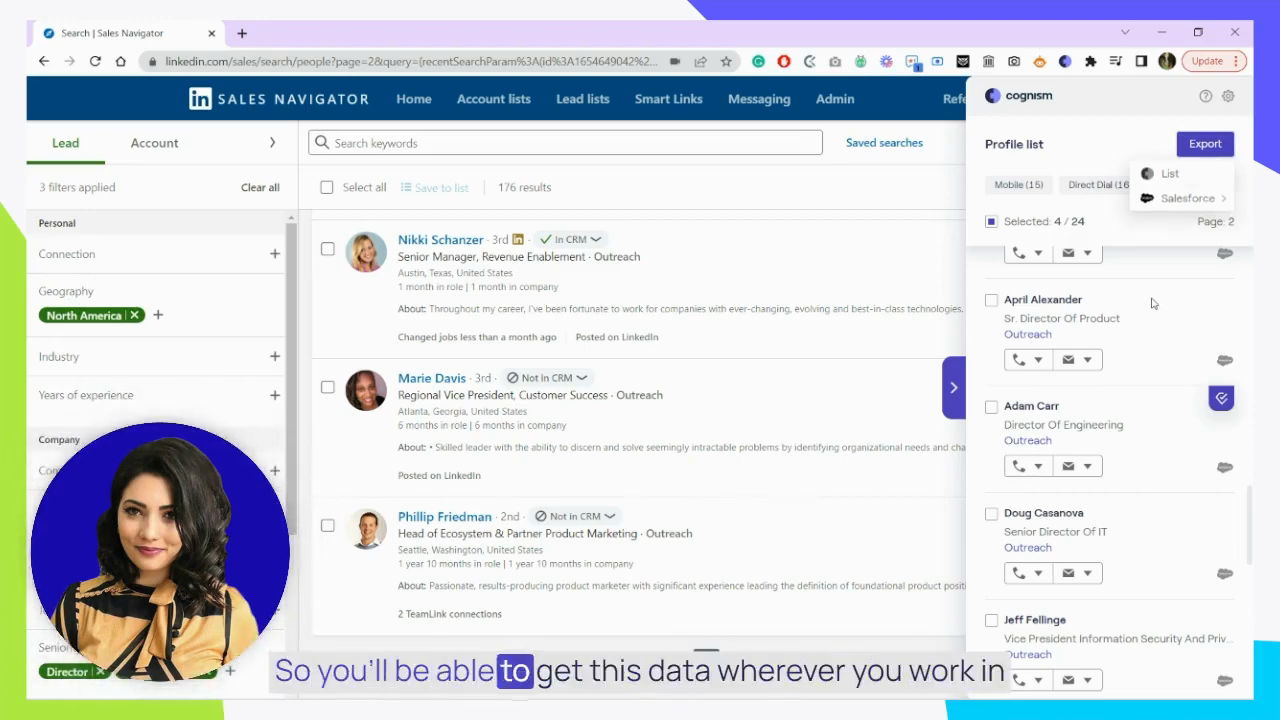
Official Cognism UI: export enriched contacts to a list or Salesforce from the Chrome extension.
Vendor UI frame from official Cognism How to use Cognism for Sales video
https://www.youtube.com/watch?v=4YG5NhxbN-w · Checked 2026-08-17
Full product screenshots and evidence live on the Cognism research page.
Bring these questions to every demo
Ask vendors to show the workflow live, not just describe it.
Write five day-one jobs, map each to researched Cognism packaging, and pick the cheapest tier that covers all five — including credits if usage-based. 1. List the five things the pod must do on day one.
Name one stack owner — not a committee — before you invite the pod. 1. Create the workspace with real company identity and timezone.
Configure one ICP list that matches how you actually prospect for the next 90 days. 1. Freeze firmographics, personas, and exclusions in writing.
Finish day-zero by proving a seller can run the loop without screenshots of another tool. 1. Connect CRM sync for contacts and activities. Research names Salesforce, HubSpot, Pipedrive, Dynamics 365, and Outreach on the Cognism side — confirm CRM sync and the connectors your daily loop depends on.
A focused pod can finish day-zero setup in one working day if seats/credits, ICP list, CRM sync, and one outreach channel are already decided. Multi-week “setup” usually means undecided packaging or missing ownership.
No. Prove prospecting → outreach → CRM logging first. Add enrichment packs only when a named decision depends on them.
Never invent list prices here — confirm seats, credits, and quote terms on /pricing/cognism/.
Have more questions? Contact our support team.
Want clearer software shortlists? Get buying guides and comparisons by email.
Newsletter coming soon.