
This video is hosted on YouTube
This content is hosted by YouTube. The player loads only after you allow marketing cookies.
Official vendor video
Creating Your First Sequence in Reply
What this shows
- Build and launch a first cold outreach sequence
lead management; contact management; email sequences; lead scoring. Email Volume | Multichannel | Jason AI SDR. Outbound SDR teams consolidating contact data and multichannel sequencing into one subscription; Agencies running outreach infrastructure across multiple client workspaces; Teams evaluating AI SDR agents and AI personalization inside an engagement suite rather than as bolt-ons. AI sales engagement platform for multichannel outbound across email, LinkedIn, calls, SMS, and WhatsApp with built-in B2B data. Buyer question: does Email Volume gating lead management change the Reply.io decision before seats scale? Decision thesis: unlike a generic sales-intelligence shortlist, Reply.io is worth it if Outbound SDR teams consolidating contact data and multichannel sequencing into one subscription outweighs Reply Data is a bundled convenience layer rather than a specialist database with published coverage figures — trade-off accepted before seats scale.
lead management decides whether Reply.io setup is a one-team pilot or a specialist project — confirm unlocks for must-have capabilities before invites.
Verified captures and vendor tutorials for configuring Reply.io before go-live — pipeline, contacts, and first workflows.
Vendor tutorial for onboarding and configuration. It is not a SoftwareGlimpse rollout plan — use this guide for judgment.
This video is hosted on YouTube
This content is hosted by YouTube. The player loads only after you allow marketing cookies.
Official vendor video
Verified captures from Reply.io's product interface.
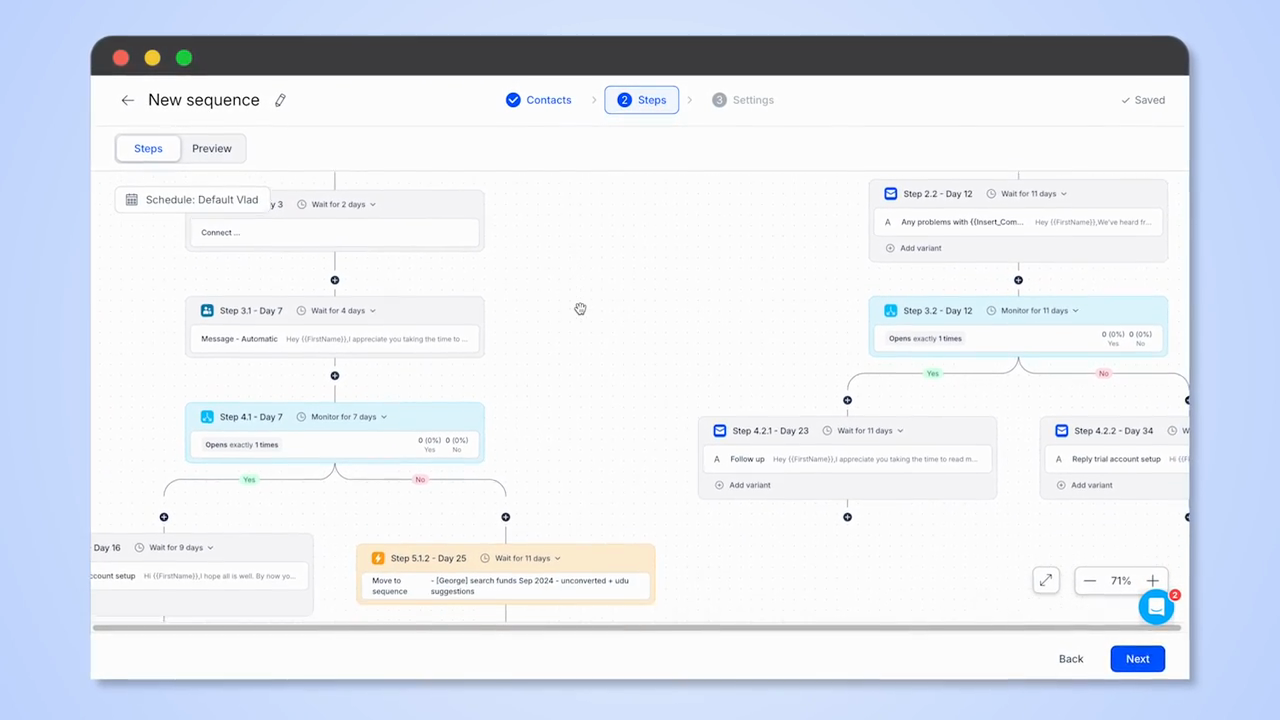
Official Reply.io UI: multichannel sequence steps with open-monitor branching.
Full product screenshots and evidence live on the Reply.io research page.
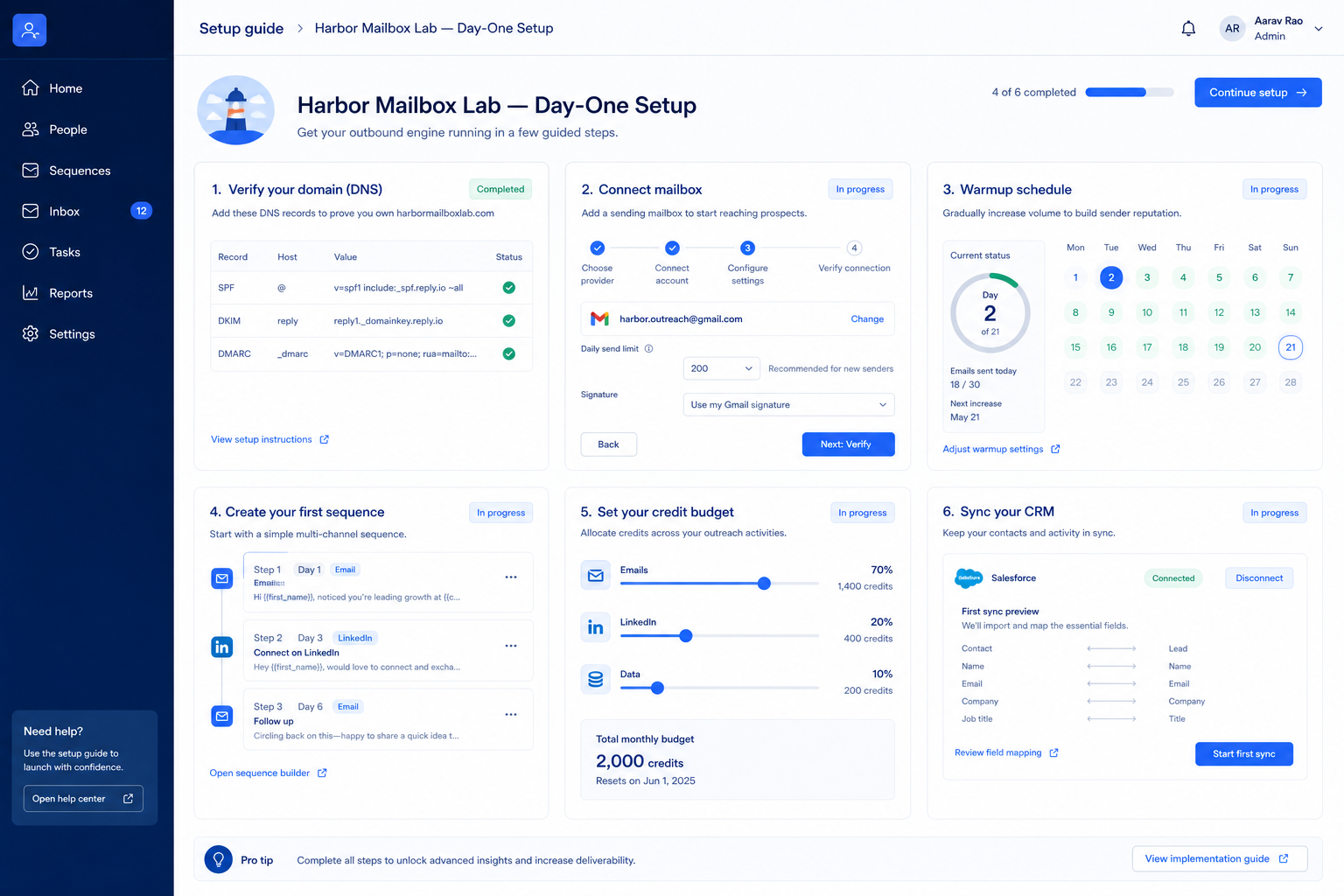
Bring these questions to every demo
Ask vendors to show the workflow live, not just describe it.
A focused pod can finish day-zero setup in one working day if seats/credits, ICP list, CRM sync, and one outreach channel are already decided. Multi-week “setup” usually means undecided packaging or missing ownership.
No. Prove prospecting → outreach → CRM logging first. Add enrichment packs only when a named decision depends on them.
Never invent list prices here — confirm seats, credits, and quote terms on /pricing/reply/.
Day zero — objects and owners
Define owners for contact management, email sequences, lead scoring before inviting the whole org.
SMB pilot
One pipeline / one team proves Outbound SDR teams consolidating contact data and multichannel sequencing into one subscription before company-wide seats.
Cutover
Freeze legacy writes briefly; validate priority integrations before reopen.
Treat Reply.io setup as a controlled rollout — not a weekend dump of CSV files.
Mistake 1
Reply Data is a bundled convenience layer rather than a specialist database with published coverage figures
Mistake 2
Jason AI SDR and Agency tiers are quote-gated, so the top of the plan ladder is not self-serve
Mistake 3
Mailbox warmup, LinkedIn accounts, and data credits create ongoing operational overhead per seat
Mistake 4
LinkedIn automation carries platform compliance risk some organizations cannot accept
Big-bang invite
Inviting every user before object design creates junk data that is expensive to unwind.
Implementation fails when unlocks needed for go-live sit on a higher tier than budgeted.
Email Volume
Suits: teams whose must-have gates appear on this tier
Multichannel
Suits: teams whose must-have gates appear on this tier
Jason AI SDR
Contact sales · Suits: teams that need custom procurement
Agency
Contact sales · Suits: teams that need custom procurement
0/3 dimensions noted — saved in this browser only.
Prep
Pilot
Scale
Have more questions? Contact our support team.
Part of Reply.io review · Sales Intelligence hub
Supporting reading in this topic — not a generic related-posts dump.
Want clearer software shortlists? Get buying guides and comparisons by email.
Newsletter coming soon.