How to Choose IT & Development Software
A practical framework for shortlisting ITSM, observability, incident/on-call, source control, hosting panels, and web-data tools by job.
Quick answer
Choose IT and development software by the job that is blocking work — ITSM, observability, incident/on-call, source control, hosting operations, or web-data collection — then confirm per-agent, per-host, ingest GB, DPS/commit, git seats, per-server panel licences, and proxy GB. Shortlist only tools whose core product is your job; Freshservice and Datadog are different purchases even when both live in this category.
- Primary job to be done
- Agents / hosts / GB / seats
- Must-have modules & gates
- Stack integrations
- Identity check (JSM ≠ Jira)
- Trial with one real workflow
What matters most
- “IT software” is several products — ITSM desks, observability platforms, on-call tools, git hosts, and hosting panels fail for different reasons. Pick the shape before you pick a brand.
- Agent vs host vs GB math changes cost — Per-agent floors, per-host infrastructure, ingest GB, DPS/commit, git seats, and panel licences often decide TCO. Price the qualifying configuration.
- Identity mix-ups hide on marketing pages — Jira Service Management is not Jira Software. PagerDuty is not Datadog. GitHub is not GitHub Copilot. Confirm which product you are actually buying.
- Do not invent scores from marketing pages — Use SoftwareGlimpse methodology qualitatively when comparing peers — see Best IT & development software for job-cluster editor’s picks.
Six worked examples
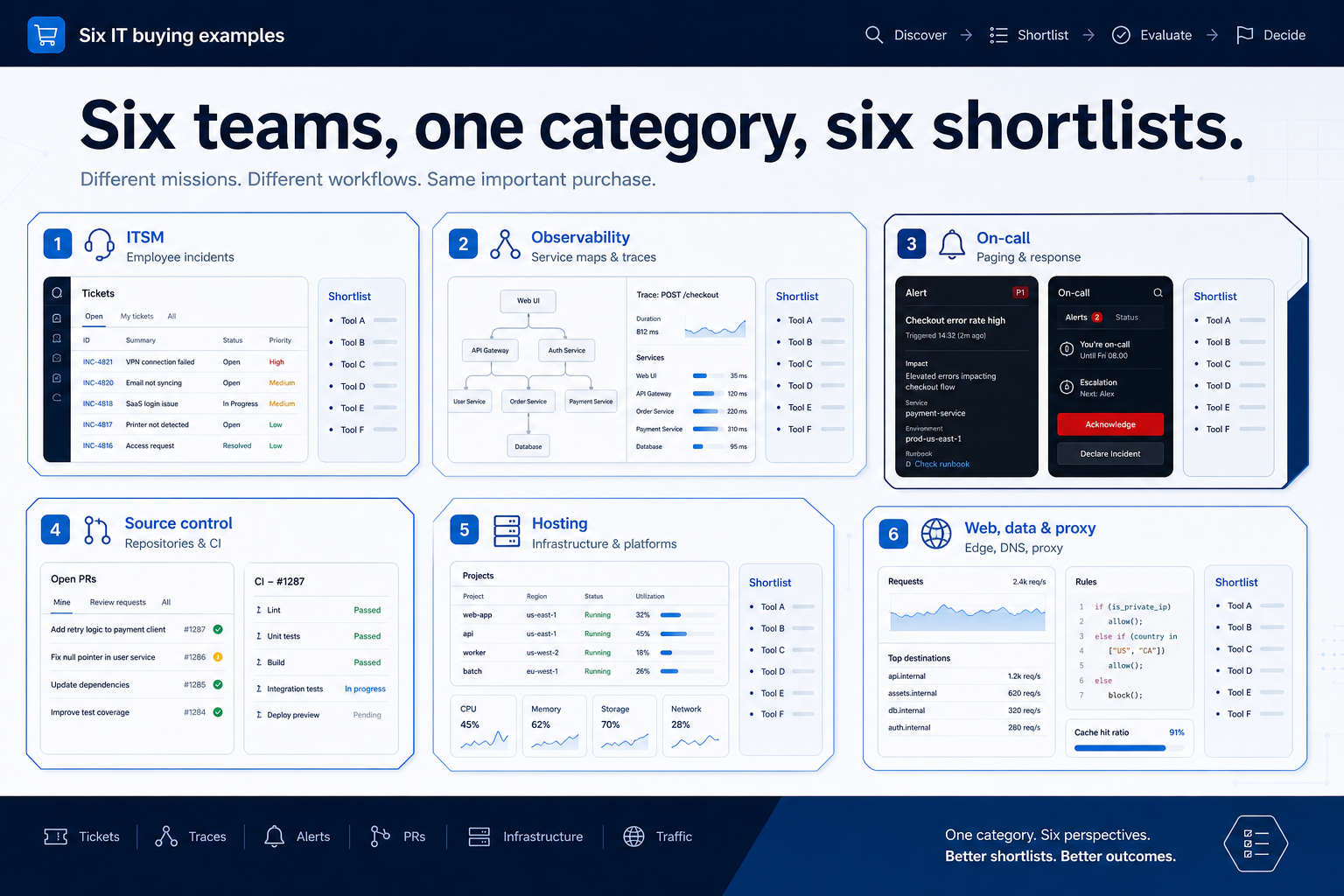
Interactive IT & development selection checklist
0/5 dimensions noted — saved in this browser only.
Primary job
People or hosts in scope
Usage unit you will hit
Must integrate with
Buying style
1. Name the job in one sentence
Write: “We need software so that ___ happens every week without spreadsheet archaeology.” If the blank is employee incidents and changes, you are in ITSM. If it is service maps and log search, you are in observability. If it is paging the on-call, buy PagerDuty-class tools. If it is repos and CI, buy source control.
Worked example: Northline Platform wrote “every latency page includes a service map, not just a Slack ping.” That sentence ruled out on-call-only tools before demos started and pointed at Datadog, New Relic, or Grafana Cloud as observability peers.
2. Map must-haves to plan and usage gates
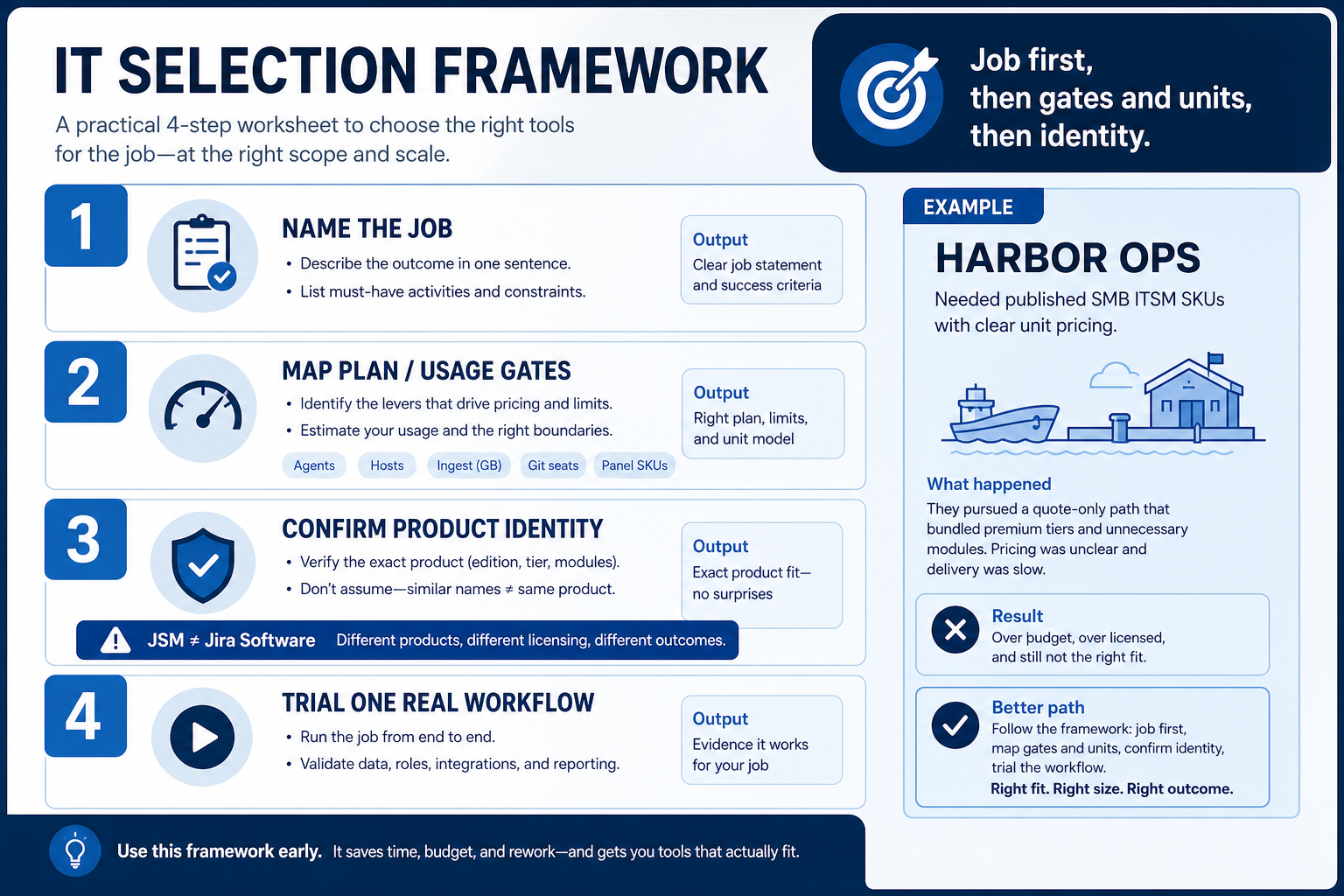
List the workflows that must work on day one — CMDB, APM, log retention, paging policies, Actions minutes, Web Host licences, or committed proxy GB — and ask which plan, host pack, ingest GB, DPS/commit, git seat, or panel SKU unlocks them. Observability vendors need a host + GB model, not just an agent count.
Worked example: Harbor Ops needed published SMB ITSM SKUs; a ServiceNow quote-only path failed that requirement, so Freshservice stayed on the ITSM sheet while Jira Service Management stayed the Atlassian-native peer — not Jira Software.
3. Run one trial script on every finalist
Pick the workflow that blocked work last quarter. Run it on every shortlist tool the same week: same data shape, same users, same success criteria. Score completion, time-to-done, and where an admin had to rescue the task.
Worked example: Harbor Labs runs the same refactor ticket on three coding tools. Tool C fails SSO on the quoted tier and is dropped before a second meeting.
4. Score on one card the same day
Use the same rubric for every vendor: must-have gates, adoption risk, integration fit, and modeled total cost band. Record who attended and which plan tier was shown — demos often run above the tier you can afford.
5. Write a one-page decision memo
Name the primary job, the qualifying configuration, the winner, and what you are explicitly not buying yet. Link to pricing and requirements guides so finance can audit assumptions later.
Next: /guides/how-to-choose-it-development-software/
6. Use a one-page checklist before demos
For How to Choose IT & Development Software, list must-haves, owners, integrations, and the weekly ritual this purchase must improve. Share the sheet with finance and IT before you schedule a second demo.
- Name the primary job in one sentence.
- List must-have gates (plans, SSO, data residency, usage caps).
- Name integrations that must work on day one.
- Assign an admin owner and a weekly user champion.
- Define non-admin proof — what a sceptic completes without rescue.
Worked example: Harbor Ops refuses demos until the checklist is signed — cutting evaluation time in half.
7. Avoid the usual buying mistakes
Common failures in it-development: buying for brand familiarity, comparing entry tiles across different usage units, skipping a fair trial script, and adding scope before adoption proves out.
Run one trial script on every finalist the same week. Score on the same card. Write a one-paragraph decision memo that names what you are not buying yet.
8. Hand off to the category shortlist
When assumptions are frozen, continue on /best/it-development-software/ with the same headcount, usage band, and must-have gates on every quote.
Frequently asked questions
Should I buy an all-in-one IT suite?
Only if you will use multiple hubs weekly. Otherwise a specialist ITSM desk, observability platform, on-call tool, git host, or hosting panel usually ships faster and clearer TCO.
How do I treat PagerDuty on an IT shortlist?
As an incident/on-call product. It is not Datadog and it does not replace metrics, traces, or logs. Compare it inside the incident-oncall cluster.
Where should I compare researched products?
See Best IT & development software for Wave-1 and Priority-2 editor’s picks by job cluster and disclosed methodology notes.
Was this article helpful?
Have more questions? Contact our support team.
Part of Software buying guides · What Is IT & Development Software?
Related guides
Supporting reading in this topic — not a generic related-posts dump.
- ThorData Plans: Seats, Hosts, and Qualifying TiersChoose your ThorData plan by mapping must-haves to qualifying tiers — seats, hosts, ingest, and add-ons — not homepage “from” tiles.
- Bright Data Plans: Seats, Hosts, and Qualifying TiersChoose your Bright Data plan by mapping must-haves to qualifying tiers — seats, hosts, ingest, and add-ons — not homepage “from” tiles.
- Is Bright Data Worth It? Fit Scenarios Before You BuyDecide if Bright Data is worth it for your team — job-cluster fit, trial proof, and packaging — without invented ROI percentages.
- Is ThorData Worth It? Fit Scenarios Before You BuyDecide if ThorData is worth it for your team — job-cluster fit, trial proof, and packaging — without invented ROI percentages.
- IT & Development Software Evaluation GuideA practical evaluation script for ITSM, observability, incident/on-call, source control, hosting panels, and web-data tools.
- IT & Development Software Pricing GuideBudget ITSM, observability, on-call, source control, hosting panels, and web-data tools by qualifying configuration — not the advertised starter tile.
- IT & Development Software Requirements GuideA practical requirements sheet for ITSM, observability, incident/on-call, source control, hosting panels, and web-data purchases.
SoftwareGlimpse Updates
Want clearer software shortlists? Get buying guides and comparisons by email.
Newsletter coming soon.