Customer Service Software Requirements Guide
A practical requirements sheet for helpdesk, live chat, ecommerce helpdesk, knowledge base, and ITSM purchases.
Quick answer
Write customer service requirements as jobs and evidence, not feature wishlists: primary job (helpdesk vs live chat vs ecommerce vs ITSM), must-have channels, SLA/routing needs, integrations, reporting cadence, and who updates tickets weekly. Decision rule: every must-have must map to a weekly outcome and a plan or volume tier you are willing to buy.
- Primary job statement
- Must-have channels
- SLA / routing needs
- Integrations list
- Reporting cadence
- Roles & permissions
Key takeaways
- Separate must from nice — If the team still operates without it for 90 days, it is nice-to-have.
- Requirements own plan gates — Omnichannel, Shopify macros, and SSO must-haves imply a qualifying configuration — write that explicitly.
- Clusters need their own sheet — Helpdesk, live-chat, and ITSM requirements should not pollute a single undifferentiated RFP.
1. Write three job statements
Capture: (1) who updates tickets or chats, (2) who needs visibility, (3) which CRM or storefront tools must sync.
Worked example: Harbor Shop wrote “Agents resolve Shopify refunds in one thread; the lead needs first-response SLAs without chasing Slack; finance needs a weekly refund export.”
2. Build a one-page score sheet
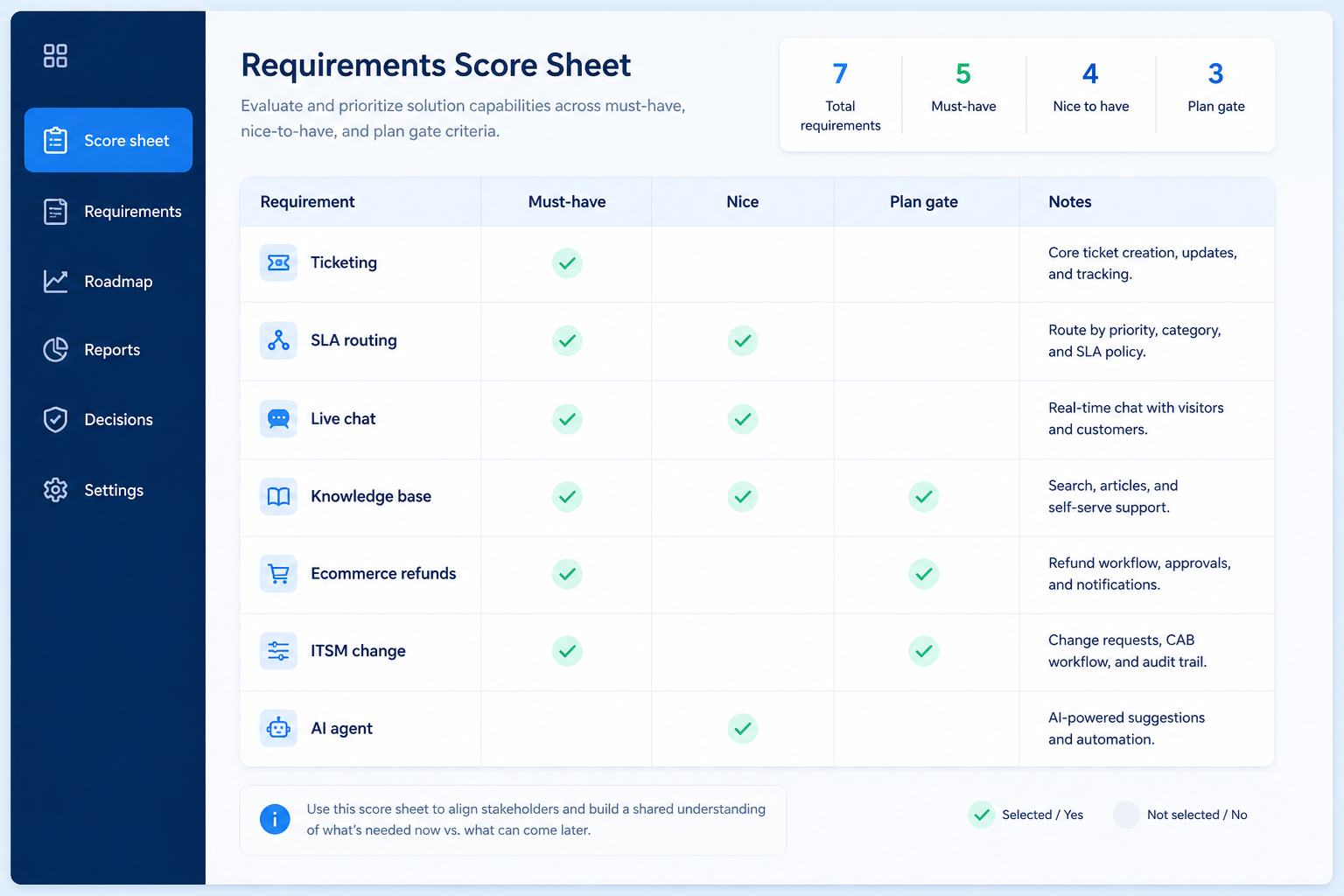
Columns: requirement, must/nice, evidence to collect in trial, qualifying plan/volume. Rows for ticketing, live chat, knowledge base, omnichannel, ecommerce context, ITSM, integrations, reporting.
This guide is the requirements surface for customer-service buyers on SoftwareGlimpse.
3. Split must-haves from nice-to-haves in writing
List day-one workflows for customer service software in two columns: must work before go-live vs can wait until adoption proves out. Must-haves drive plan gates and integrations; nice-to-haves belong on a phase-two sheet so demos do not inflate scope.
Worked example: Harbor People Ops marks SSO and audit logs as must-have, AI summaries as phase-two. Demos that skip the must column get cut from the shortlist early.
4. Map integrations and data boundaries
Name systems that must sync or stay out of scope: identity, payroll, CRM, ecommerce, chat, or data warehouse. For each integration, note whether it is native, API, or manual export — and who owns the connection when it breaks.
Worked example: Northline Finance requires HRIS sync to payroll and refuses tools that need nightly CSV babysitting unless IT signs off.
5. Get a one-page sign-off before trials
Share the must-have sheet with finance, IT, and the team lead who owns the weekly job. Trials should test the signed sheet — not a fresh wishlist from each demo.
Next: /guides/how-to-choose-customer-service-software/
6. Use a one-page checklist before demos
For Customer Service Software Requirements Guide, list must-haves, owners, integrations, and the weekly ritual this purchase must improve. Share the sheet with finance and IT before you schedule a second demo.
- Name the primary job in one sentence.
- List must-have gates (plans, SSO, data residency, usage caps).
- Name integrations that must work on day one.
- Assign an admin owner and a weekly user champion.
- Define non-admin proof — what a sceptic completes without rescue.
Worked example: Harbor Ops refuses demos until the checklist is signed — cutting evaluation time in half.
7. Avoid the usual buying mistakes
Common failures in customer-service: buying for brand familiarity, comparing entry tiles across different usage units, skipping a fair trial script, and adding scope before adoption proves out.
Run one trial script on every finalist the same week. Score on the same card. Write a one-paragraph decision memo that names what you are not buying yet.
8. Hand off to the category shortlist
When assumptions are frozen, continue on /best/customer-service-software/ with the same headcount, usage band, and must-have gates on every quote.
9. Use a one-page checklist before demos
For Customer Service Software Requirements Guide, list must-haves, owners, integrations, and the weekly ritual this purchase must improve. Share the sheet with finance and IT before you schedule a second demo.
- Name the primary job in one sentence.
- List must-have gates (plans, SSO, data residency, usage caps).
- Name integrations that must work on day one.
- Assign an admin owner and a weekly user champion.
- Define non-admin proof — what a sceptic completes without rescue.
Worked example: Harbor Ops refuses demos until the checklist is signed — cutting evaluation time in half.
10. Avoid the usual buying mistakes
Common failures in customer-service: buying for brand familiarity, comparing entry tiles across different usage units, skipping a fair trial script, and adding scope before adoption proves out.
Run one trial script on every finalist the same week. Score on the same card. Write a one-paragraph decision memo that names what you are not buying yet.
11. Hand off to the category shortlist
When assumptions are frozen, continue on /best/customer-service-software/ with the same headcount, usage band, and must-have gates on every quote.
Frequently asked questions
Should requirements include scores?
No invented product scores. Capture evidence against your jobs; use Best page methodology for cluster editor’s picks.
How many must-haves is too many?
If more than roughly eight items are must-haves, you are still in wishlist mode — force a ranking.
Was this article helpful?
Have more questions? Contact our support team.
Part of Software buying guides · What Is Customer Service Software?
Related guides
Supporting reading in this topic — not a generic related-posts dump.
- Customer Service Software Evaluation GuideA practical evaluation script for helpdesk, live chat, ecommerce helpdesk, knowledge base, and ITSM tools.
- Customer Service Software Pricing GuideBudget helpdesk, live chat, ecommerce helpdesk, and ITSM tools by qualifying configuration — not the advertised starter tile.
SoftwareGlimpse Updates
Want clearer software shortlists? Get buying guides and comparisons by email.
Newsletter coming soon.