What Is Customer Service Software?
A clear definition of helpdesk, live chat, ecommerce helpdesk, knowledge bases, and ITSM — and how they differ from CRM.
Quick answer
Customer service software helps teams queue tickets, chat with website visitors, publish help articles, or run an internal IT service desk — not CRM sales pipelines. Decision rule: if the blocking job is “we need owned tickets and SLAs,” buy a helpdesk; if it is live website conversations, buy live chat; if it is Shopify order/refund context, buy an ecommerce helpdesk; if it is ITIL incidents and changes, buy ITSM — do not force those jobs into one undifferentiated ranking.
- Helpdesk / ticketing
- Live chat support
- Ecommerce helpdesk
- Knowledge base / self-service
- ITSM / service desk
- Not a CRM pipeline
Key takeaways
- The category holds several jobs — Helpdesk, live chat, ecommerce inboxes, knowledge bases, and ITSM desks fail for different reasons. Naming the job first prevents most bad shortlists.
- Customer service software is not a CRM — CRMs own revenue pipeline. Support tools own conversations, tickets, and deflection — then integrate with CRM when agents need account context.
- Pricing units are not interchangeable — Per-agent seats, ticket/conversation caps, and AI outcome/credit packs change TCO more than the starter tile.
- AI is assistance, not a substitute core — Bots and copilots sit on top of a helpdesk or chat product. Score them as assistance — not as a reason to skip ticketing or SLAs.
Customer service software building blocks
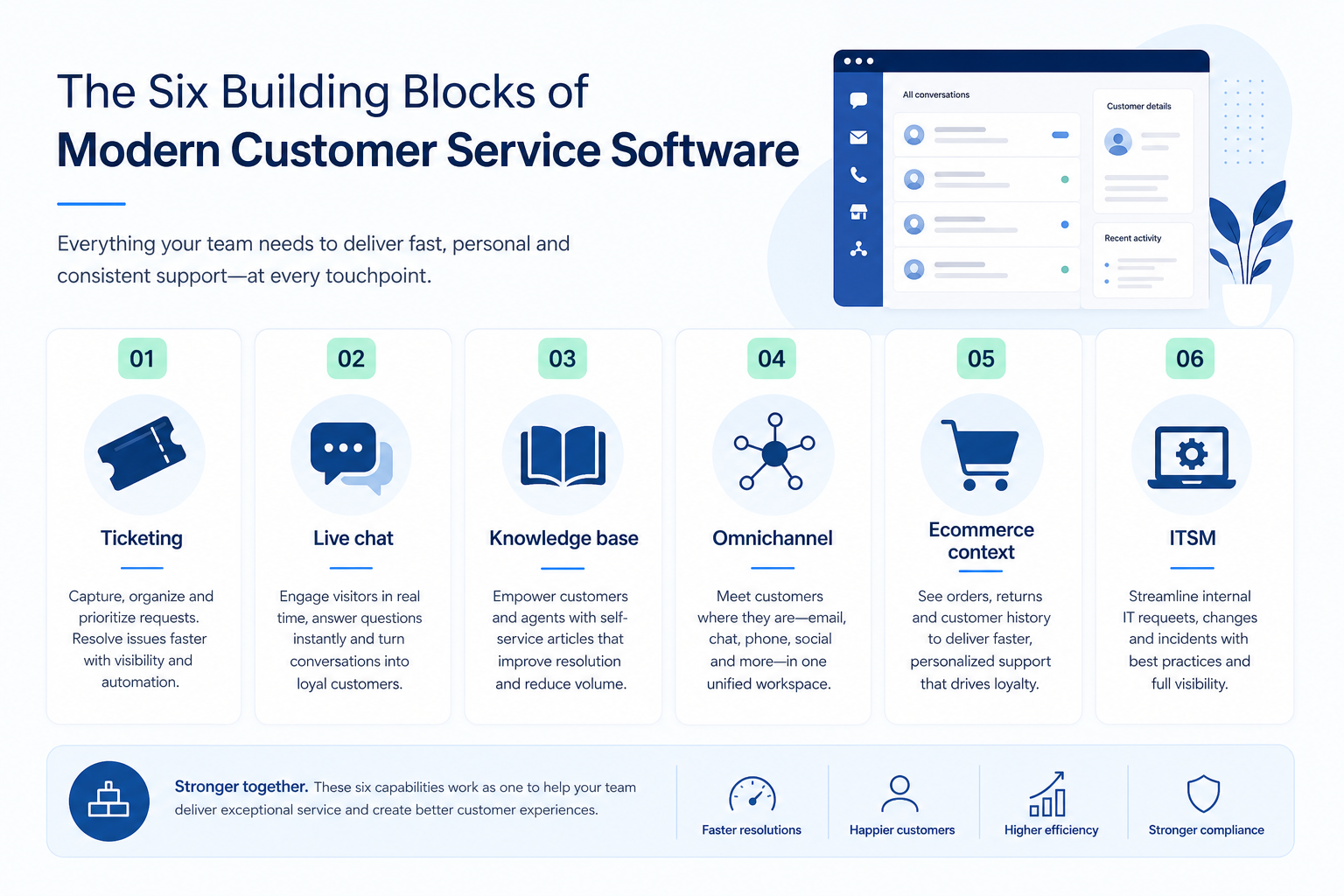
1. How does customer service software work?
Ticket
Emails become owned tickets with next steps.
Chat
Website visitors reach a routed agent.
Docs
Customers solve repeats without a ticket.
Channels
Email, chat, and social share one workspace.
Commerce
Order and refund context sits in the inbox.
Most support platforms specialise: helpdesks turn email into owned tickets with SLAs; live-chat products route website visitors; knowledge bases deflect repeats; ecommerce helpdesks surface orders beside the conversation; ITSM desks run incidents and changes for employees.
Example: Harbor Shop, a 12-person DTC brand, starts with live chat for pre-purchase questions, then adds an ecommerce helpdesk when refund tickets outgrow the messenger — without buying an ITSM suite they do not need.
2. What customer service software typically includes
Depending on job cluster: ticketing and macros; website messengers and canned replies; help centers and portals; omnichannel inboxes; order-aware ecommerce workflows; or ITIL incidents, problems, and changes.
Job clusters matter more than brand names: helpdesk peers, live-chat widgets, ecommerce inboxes, and ITSM desks rarely belong on the same undifferentiated shortlist. Catalogue examples are shapes to compare by primary job — not a ranking.
Common customer service software shapes (not rankings)
Helpdesk / ticketing
Best for: Teams that need email-to-ticket queues, SLAs, and assignment.
Avoid when: Your primary job is website live chat only, or ITIL change management.
Live chat support
Best for: Sites that need visitor chat, routing, and canned replies in real time.
Avoid when: You need full ticketing, SLAs, or an employee ITSM desk.
Ecommerce helpdesk
Best for: Shopify/DTC teams that need order, refund, and shipping context in the inbox.
Avoid when: You run B2B ticketing or internal IT with no storefront.
ITSM / service desk
Best for: IT teams running incidents, problems, changes, and assets.
Avoid when: Customer ecommerce chat or SMB shared inbox is the real purchase.
3. Name the job customer service software should own
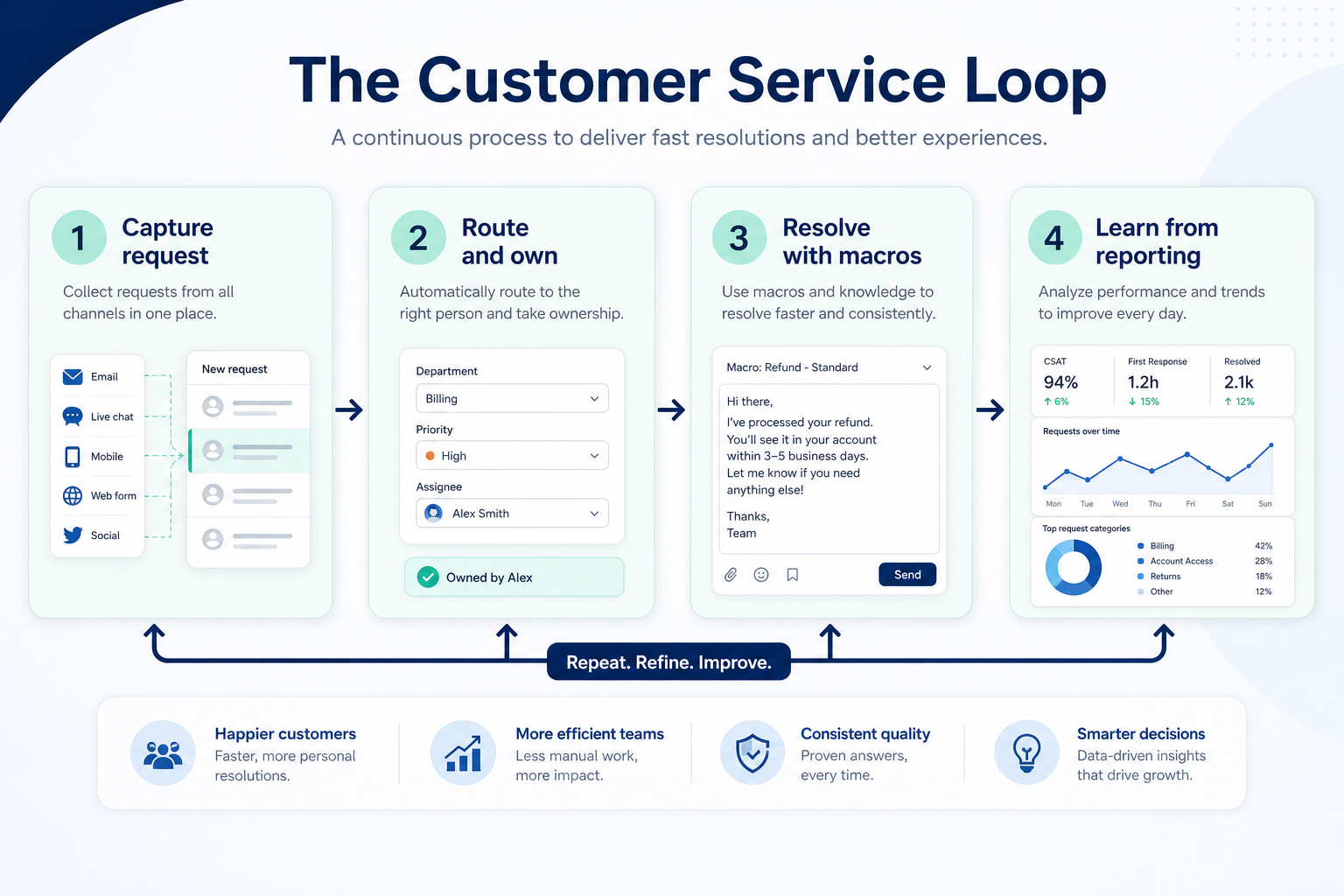
Support platforms turn conversations into owned work: intake, ticket or chat session, reply, deflect repeats with docs, escalate, then close with reporting. Helpdesk, live chat, ecommerce inboxes, and ITSM each emphasise different steps.
Example: Harbor Shop starts with live chat for pre-purchase questions, then adds an ecommerce helpdesk when refund tickets outgrow the messenger — without buying an ITSM suite.
4. Next: freeze requirements and compare fairly
Move to /guides/how-to-choose-customer-service-software/ once the job cluster is clear. Compare finalists with the same assumptions — not affiliate-ordered lists.
5. Use a one-page checklist before demos
For What Is Customer Service Software?, list must-haves, owners, integrations, and the weekly ritual this purchase must improve. Share the sheet with finance and IT before you schedule a second demo.
- Name the primary job in one sentence.
- List must-have gates (plans, SSO, data residency, usage caps).
- Name integrations that must work on day one.
- Assign an admin owner and a weekly user champion.
- Define non-admin proof — what a sceptic completes without rescue.
Worked example: Harbor Ops refuses demos until the checklist is signed — cutting evaluation time in half.
6. Avoid the usual buying mistakes
Common failures in customer-service: buying for brand familiarity, comparing entry tiles across different usage units, skipping a fair trial script, and adding scope before adoption proves out.
Run one trial script on every finalist the same week. Score on the same card. Write a one-paragraph decision memo that names what you are not buying yet.
7. Hand off to the category shortlist
When assumptions are frozen, continue on /best/customer-service-software/ with the same headcount, usage band, and must-have gates on every quote.
Frequently asked questions
Is customer service software the same as a CRM?
No. CRM systems track customers and revenue. Customer service software tracks tickets, chats, and deflection — though stacks often integrate so agents see account context.
Do I need one suite or specialist tools?
Buy for the job that creates the most rework this quarter. Suites help when you will use multiple hubs weekly; specialists win when one job dominates.
Where do Zendesk Suite, Freshdesk, Freshchat, and Gorgias fit?
They are Wave-1 cluster leaders or peers for helpdesk, live chat, and ecommerce helpdesk. Compare inside those jobs — see Best customer service software for methodology-based editor’s picks.
Was this article helpful?
Have more questions? Contact our support team.
Part of Software buying guides · How to Choose Customer Service Software
Related guides
Supporting reading in this topic — not a generic related-posts dump.
- Customer Service Software Evaluation GuideA practical evaluation script for helpdesk, live chat, ecommerce helpdesk, knowledge base, and ITSM tools.
- Customer Service Software Pricing GuideBudget helpdesk, live chat, ecommerce helpdesk, and ITSM tools by qualifying configuration — not the advertised starter tile.
- Customer Service Software Requirements GuideA practical requirements sheet for helpdesk, live chat, ecommerce helpdesk, knowledge base, and ITSM purchases.
- AI Software vs Customer Service SoftwareAI software here is LLM, coding, media, meeting, and agent/automation jobs. A helpdesk may include AI assist, but ticketing and SLAs are still a customer-service purchase.
- Business Communications Software vs Customer Service SoftwareBusiness communications owns numbers, routing, and live conversations. Customer service software owns tickets, SLAs, knowledge bases, and helpdesk queues.
SoftwareGlimpse Updates
Want clearer software shortlists? Get buying guides and comparisons by email.
Newsletter coming soon.