
This video is hosted on YouTube
This content is hosted by YouTube. The player loads only after you allow marketing cookies.
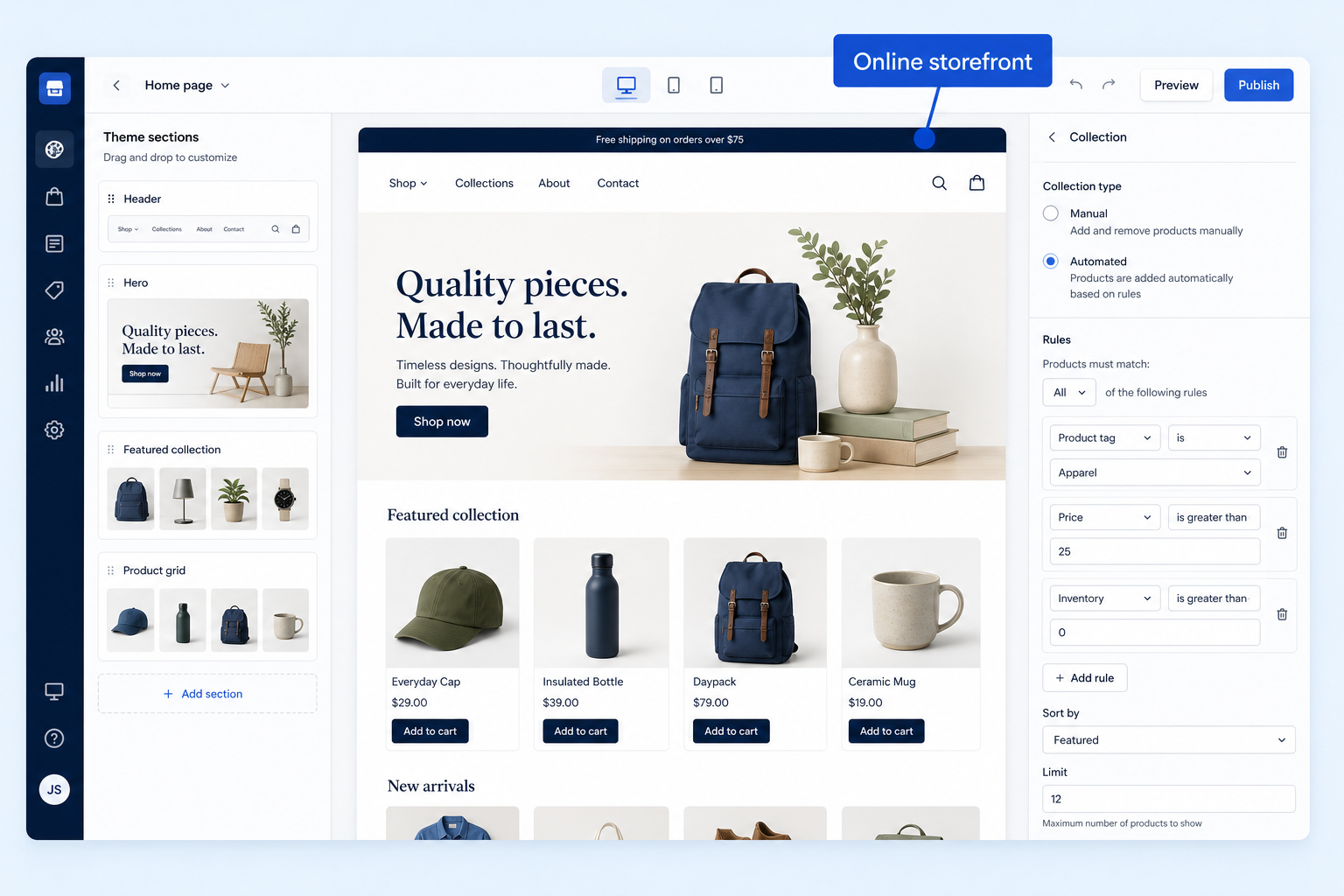
Branded product pages, themes, and a shoppable domain.
At a glance
A shoppable branded store
Founders, merchandisers, retail ops, and warehouse staff
Theme quality · Custom domain · Mobile UX · Plan gates
9 products to explore
Fit snapshot
Online storefront is the capability that publishes a catalog customers can browse and buy from — hosted SaaS or open-source.
DTC founders and merchandisers launching or redesigning a shop.
How teams put CRM to work for storefront
Example 1
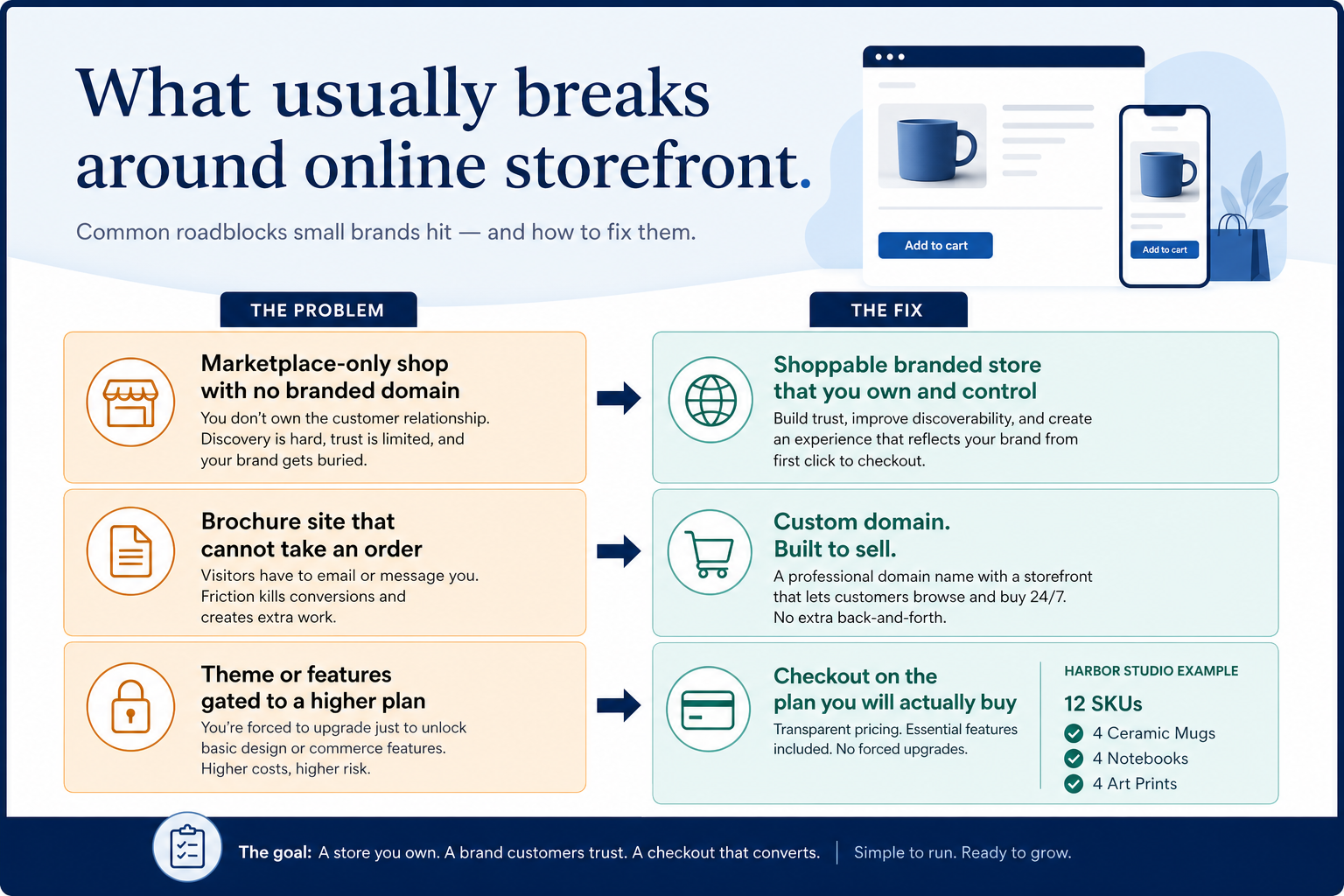
Harbor Studio publishes 12 SKUs on a branded domain instead of a marketplace-only shop.
Example 2
a WordPress site adds WooCommerce rather than migrating off the CMS.
These are the operating problems that usually push teams toward CRM for storefront — not feature wish lists.
Without CRM discipline: Teams discover the feature only after buying the wrong plan.
Without CRM discipline: Adoption fails and orders drift back to spreadsheets.
Without CRM discipline: Apps, processing, or hosting blow the starter-tile budget.
Without CRM discipline: A sourcing app is forced to act like a storefront — or POS is an afterthought.
A CRM only helps when the team keeps owners, history, and next steps current. Here is what “good” looks like for storefront.
With CRM discipline: Map must-haves to the qualifying plan before purchase.
With CRM discipline: Trial with a real SKU and a sceptic operator.
With CRM discipline: Model subscription + processing + apps at your GMV.
With CRM discipline: Keep clusters on separate decision paths.
Clearer operating loop
The capability supports a weekly ritual people keep.
Less rework
Catalog, checkout, or fulfillment needs fewer manual chases.
Better evidence
Operators can review orders, inventory, or imports without a vendor screenshot.
Evaluate themes, custom domain, and checkout on the plan you will buy.
Theme quality as a buying lens for this capability.
Custom domain as a buying lens for this capability.
Mobile UX as a buying lens for this capability.
Start with must-haves your team will use weekly. Treat nice-to-haves as later upgrades — not day-one blockers.
Must-have
Nice-to-have
A simple operating loop beats a complex board nobody updates.
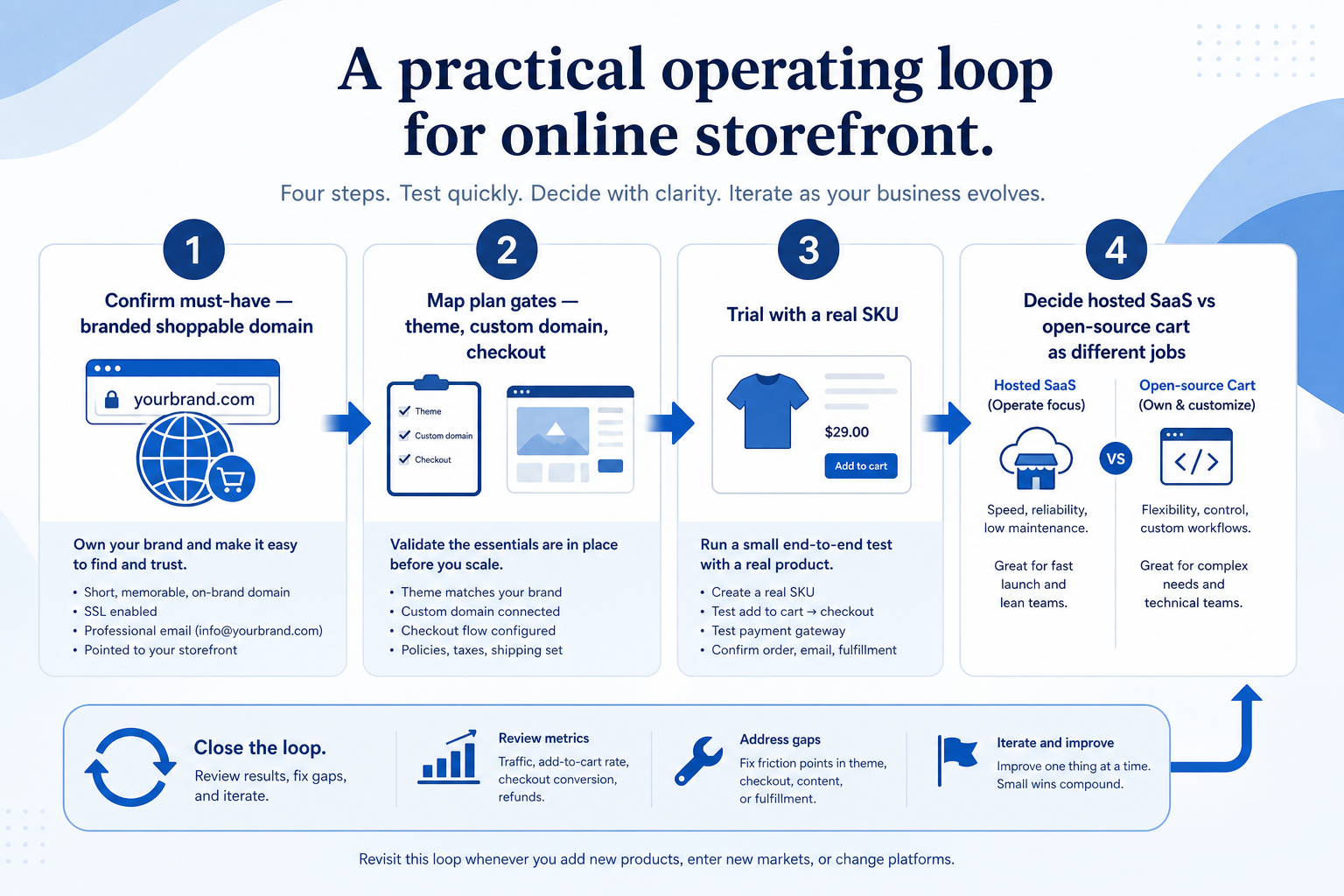
Write the weekly outcome this capability must deliver.
Check which tier unlocks the workflow.
Run one SKU through catalog, checkout, or import.
Compare peers for the same job — not across clusters.
Broader capability workflow demos for storefront — distinct from narrow feature walkthroughs.
Official vendor demonstrations help show how different CRM platforms approach the workflows, features and interactions that make up storefront. Absence of a video does not mean a product lacks the capability.

WooCommerce
How to set up WooCommerce: quick tour of the admin dashboard
Focus: How WooCommerce presents the product in an official vendor video.
This video is hosted on YouTube
This content is hosted by YouTube. The player loads only after you allow marketing cookies.
What this shows
What to notice
What this does not establish
Features visible in this demo
Particularly relevant to
Source: WooCommerce · Verified 18 Aug 2026

Square Online
Square Online: Made to Order for Retail
Focus: How Square Online presents the product in an official vendor video.

This video is hosted on YouTube
This content is hosted by YouTube. The player loads only after you allow marketing cookies.
What this shows
What to notice
What this does not establish
Features visible in this demo
Particularly relevant to
Source: Square · Verified 18 Aug 2026

Ecwid
How to Build an Online Store in just a few clicks - Quick Start Guide
Focus: How Ecwid presents the product in an official vendor video.

This video is hosted on YouTube
This content is hosted by YouTube. The player loads only after you allow marketing cookies.
What this shows
What to notice
What this does not establish
Features visible in this demo
Particularly relevant to
Source: Ecwid / Lightspeed · Verified 18 Aug 2026

Salesforce Commerce Cloud
Multi-Site Management Strategies | B2C Commerce
Focus: How Salesforce Commerce Cloud presents the product in an official vendor video.

This video is hosted on YouTube
This content is hosted by YouTube. The player loads only after you allow marketing cookies.
What this shows
What to notice
What this does not establish
Features visible in this demo
Particularly relevant to
Source: Salesforce · Verified 18 Aug 2026
Evidence-backed workflow comparison using official vendor demos and screenshots — not a ranking or entertainment gallery. Absence of media does not mean a product lacks the capability.
WooCommerce
WooCommerce emphasizes
Square Online
Square Online emphasizes
SoftwareGlimpse take
WooCommerce evidence emphasizes WooCommerce product surfaces as shown in the official vendor video; Square Online evidence emphasizes Square Online product surfaces as shown in the official vendor video. These are observations from official sources, not inferred brand philosophy.
Best when
This capability is central to the weekly commerce ritual.
Best when
Another ecommerce cluster is primary — keep this on a secondary shortlist.
Catalogue products tagged to related use cases for online storefront. Inclusion here is not a ranking.

Ecommerce
Hosted SaaS ecommerce platform with themes, checkout, channels, and POS — Basic from $39/mo ($29 annual), Grow $105 ($79 annual), Advanced $399 ($299 annual), Plus from $2,300/mo.

Ecommerce
Open-SaaS ecommerce platform — Core $39/mo ($29 annual), Growth $105 ($79), Scale $399 ($299); GMV thresholds and open payment provider fees apply on 2026 plans.
Ecommerce
Open-source WordPress commerce plugin — free core; paid extensions, hosting, and WooPayments processing are separate TCO lines.
Ecommerce
Square ecosystem online store — Free $0/mo (higher online processing), Plus $49/location, Premium $149/location; 30-day trials on paid tiers.

Ecommerce
Open-source Magento core (free) plus Adobe Commerce enterprise licenses (GMV quote) — deep catalog/B2B with high hosting and agency TCO.

Ecommerce
Website-first builder with ecommerce from Core — Light $17/mo annual, Core $29 (sell online), Business $39, Business Elite $159 (annual tiles; monthly higher).

Ecommerce
Design-led website builder with commerce — Basic $16, Core $23, Plus $39, Advanced $99/mo annual (US 2026 tiles); platform transaction fees vary by plan.
Ecommerce
Embeddable storefront you add to an existing site — Starter $5/mo, Venture $29 annual, Business $49, Unlimited $119 (post 2 Mar 2026 tiles); no Ecwid transaction fees.
Ecommerce
Salesforce B2C Commerce (ex-Demandware) — Growth/Plus/Premium are GMV-percent quote only; enterprise SaaS landscape, not an SMB Shopify substitute.
Loading evidence explorer…
No. Fit depends on your primary ecommerce job (hosted SaaS vs open-source vs omnichannel POS vs dropshipping sourcing), catalog complexity, and which requirements are must-haves. Use the Best ecommerce software shortlist and how-to-choose guide rather than starting from a single ranking.
CRM capabilities store relationships and pipeline on customer records. Ecommerce capabilities run storefront, catalog, checkout, and fulfillment — often integrating with ads and email. Buy for the commerce job that is blocking first.
SKUs, variants, collections, and merchandising at scale.
Cart, payment methods, and conversion at the last step.
Part of CRM capabilities · CRM Software hub
Want clearer software shortlists? Get buying guides and comparisons by email.
Newsletter coming soon.
Explore the official documentation, screenshots and product demonstrations used to understand how each CRM implements storefront.
12 items
Official video · Ecwid
Supports
Demonstrates
This video is hosted on YouTube
This content is hosted by YouTube. The player loads only after you allow marketing cookies.
Official vendor video
How Ecwid presents the product in an official vendor video.
Verified: 18 Aug 2026
Open source ↗Official video · Ecwid
Supports
Demonstrates

This video is hosted on YouTube
This content is hosted by YouTube. The player loads only after you allow marketing cookies.
Official vendor video
How Ecwid presents the product in an official vendor video.
Verified: 18 Aug 2026
Open source ↗Official video · Ecwid
Supports
Demonstrates

This video is hosted on YouTube
This content is hosted by YouTube. The player loads only after you allow marketing cookies.
Official vendor video
Verified: 18 Aug 2026
Open source ↗Official video · Magento
Supports
Demonstrates

This video is hosted on YouTube
This content is hosted by YouTube. The player loads only after you allow marketing cookies.
Official vendor video
Verified: 18 Aug 2026
Open source ↗Official video · Salesforce Commerce Cloud
Supports
Demonstrates
This video is hosted on YouTube
This content is hosted by YouTube. The player loads only after you allow marketing cookies.
Official vendor video
How Salesforce Commerce Cloud presents the product in an official vendor video.
Verified: 18 Aug 2026
Open source ↗Official video · Salesforce Commerce Cloud
Supports
Demonstrates

This video is hosted on YouTube
This content is hosted by YouTube. The player loads only after you allow marketing cookies.
Official vendor video
How Salesforce Commerce Cloud presents the product in an official vendor video.
Verified: 18 Aug 2026
Open source ↗Official video · Salesforce Commerce Cloud
Supports
Demonstrates

This video is hosted on YouTube
This content is hosted by YouTube. The player loads only after you allow marketing cookies.
Official vendor video
Verified: 18 Aug 2026
Open source ↗Official video · Shopify
Supports
Demonstrates

This video is hosted on YouTube
This content is hosted by YouTube. The player loads only after you allow marketing cookies.
Official vendor video
Verified: 18 Aug 2026
Open source ↗Official video · Square Online
Supports
Demonstrates
This video is hosted on YouTube
This content is hosted by YouTube. The player loads only after you allow marketing cookies.
Official vendor video
How Square Online presents the product in an official vendor video.
Verified: 18 Aug 2026
Open source ↗Official video · Squarespace
Supports
Demonstrates

This video is hosted on YouTube
This content is hosted by YouTube. The player loads only after you allow marketing cookies.
Official vendor video
Verified: 18 Aug 2026
Open source ↗Official video · Wix
Supports
Demonstrates

This video is hosted on YouTube
This content is hosted by YouTube. The player loads only after you allow marketing cookies.
Official vendor video
Verified: 18 Aug 2026
Open source ↗Official video · WooCommerce
Supports
Demonstrates
This video is hosted on YouTube
This content is hosted by YouTube. The player loads only after you allow marketing cookies.
Official vendor tutorial
How WooCommerce presents the product in an official vendor video.
Verified: 18 Aug 2026
Open source ↗