SoftwareGlimpse
Sales Intelligence Software

6sense Implementation: 30/60/90 Outbound Rollout That Sticks

Plan a practical 6sense rollout — owners, credits/seats, list quality, sequences or dialer, and CRM sync — so outbound becomes a repeatable motion.

By Lee M.Updated Aug 17, 20267 min readFact-checked

Quick answer

Roll out 6sense in three phases: days 1–30 get outbound work happening in the tool with CRM logging, days 31–60 make weekly list and sequence reviews run from 6sense, and days 61–90 add only channels or enrichment that still aren’t working. If reps still burn credits without a logged CRM next step by week two, pause new features and fix that first.

  • Freeze 3 outcomes
  • Name a stack owner
  • Day 30: live outbound loop
  • Day 60: channel rhythm
  • Day 90: expand carefully
  • Usage before features

6sense rollout media

Official setup walkthroughs and product surfaces that matter while you roll out 6sense — not a full product gallery.

Official 6sense setup walkthrough

Vendor tutorial for onboarding and configuration. It is not a SoftwareGlimpse rollout plan — use this guide for judgment.

This video is hosted on YouTube

This content is hosted by YouTube. The player loads only after you allow marketing cookies.

Official vendor tutorial

Ways 6sense AEs Use AI to Accelerate Open Opportunities & Boost Deal Sizes

What this shows

  • AE workflows using 6sense AI on open opportunities
  • Deal acceleration with account intelligence
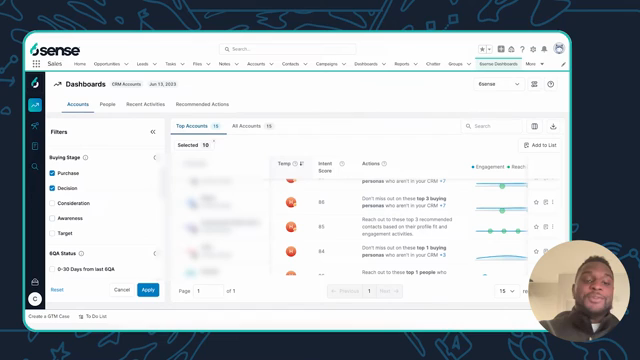
Product screenshots

Verified captures from 6sense's product interface.

6sense CRM Accounts dashboard with intent scores and recommended actions

Official 6sense UI: CRM Accounts dashboard with temperature, intent score, and recommended outreach actions.

Vendor UI frame from official 6sense BDR intelligence video

https://www.youtube.com/watch?v=DjzS_DZOEYw · Checked 2026-08-17

Full product screenshots and evidence live on the 6sense research page.

6sense rollout takeaways

  • Implementation is habit work Enterprise account-based marketing and sales intelligence platform that combines predictive buying intent, contact/account data, and go-to-market orchestration for mid-market and enterprise revenue teams. None of that helps until the weekly outbound loop is boring.
  • Sequence features to plan gates Our research does not flag plan-gated capabilities for 6sense, but confirm your must-haves — including credits and seats — against the packaging you actually intend to buy.
  • Enable in this order Days 1–30: contact data, prospecting, data enrichment, and email outreach. Days 31–60: reporting and email sequences. Days 61–90: data enrichment, AI assistance, and second ICP list.
  • Measure usage, not configuration Count meetings booked, reply/connect rates, credits used per meeting, and CRM-logged activities from 6sense — not modules enabled.
  • Know what you inherited Research watch-outs to plan around: Custom-quote only — no public seat dollar prices; Implementation and admin overhead are material; Native sequencing is limited vs dedicated engagement suites.

6sense 30/60/90 path

  1. 1Outcomes
  2. 2Live loop
  3. 3Rhythm
  4. 4Expand

6sense implementation walkthrough

6sense implementation walkthrough diagram.
Treat 6sense rollout as gated phases — adoption before credit expansion.

6sense must vs nice

Must-have
  • Logged CRM activities from outreach
  • Weekly list / sequence review
Nice-to-have
  • data enrichment
  • AI assistance

6sense checklist

Bring these questions to every demo

Ask vendors to show the workflow live, not just describe it.

  • 1Freeze three 90-day outcomesMeetings, coverage, or reply goals with owners.
  • 2Day 30: live outbound loopEvery active rep runs list → outreach → CRM weekly.
  • 3Day 60: usage reviewCredits per meeting and sequence hygiene on the agenda.
  • 4Day 90: expand only gapsAdd channels or packs that still miss an outcome.

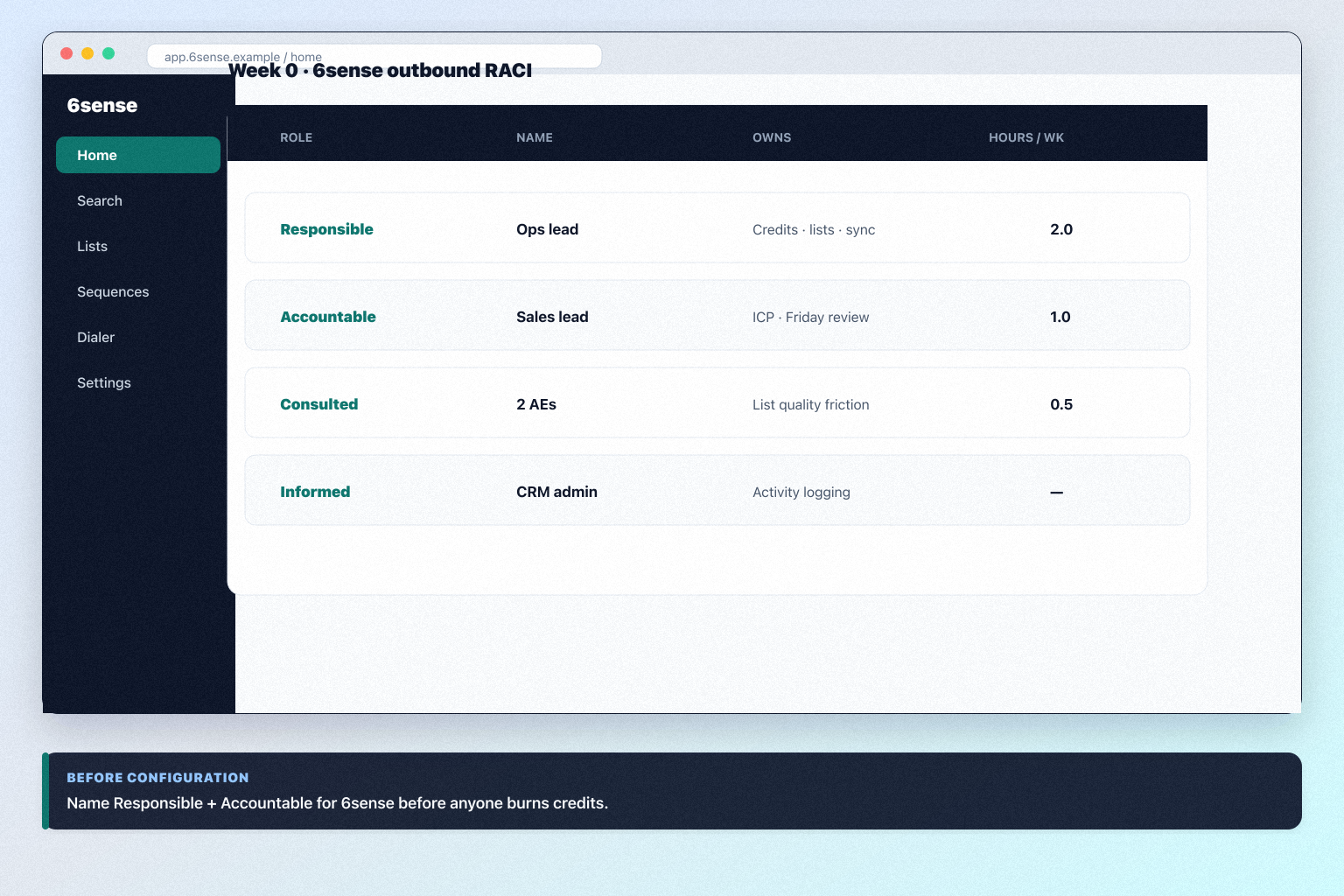
1. Freeze outcomes and RACI before you configure 6sense

6sense implementation diagram 1.
Name Responsible + Accountable for 6sense before configuration sprawl.

Lock three 90-day outcomes and name Responsible / Accountable before anyone burns credits. 1. Write exactly three 90-day outcomes in business language (meetings, coverage, reply quality).

  1. Assign RACI — Responsible: 6sense stack owner; Accountable: sales lead; Consulted: two reps; Informed: RevOps / CRM admin.
  2. Write the “not now” list for channels and packs not tied to the three outcomes.
  3. Book the day-30 and day-60 reviews in the calendar now. Worked example: an 8-person B2B outbound pod freezes three outcomes for 6sense, gives ops two hours a week as Responsible, and defers data enrichment and AI assistance to day 61.

2. Days 1–30: get the outbound loop live

6sense implementation diagram 2.
Day 30 success in 6sense: live lists and logged outreach, not feature sprawl.

Days 1–30 are for contact data, prospecting, data enrichment, and email outreach — not marketplace browsing. 1. Finish setup: one ICP list, CRM sync, one outreach channel.

  1. Invite only daily users; spectators wait.
  2. Run a mid-month spot-check: 20 random outreaches must show a CRM activity.
  3. Kill shadow spreadsheets that still hold “the real list.” Worked example: an 8-person B2B outbound pod runs 6sense as the only place new contacts enter sequences, and by day 30 every open sequence step has an owner and a CRM log.

3. Days 31–60: install the weekly rhythm

6sense implementation diagram 3.
Weekly 6sense reviews decide expand vs fix — not vanity dashboards.

Make Friday (or Monday) reviews run from 6sense. 1. Agenda: credit burn vs meetings, list quality flags, sequence reply rates, CRM sync errors.

  1. Add light automation only where a human already does the same step weekly. email sequences is researched across every 6sense plan we snapshot
  2. Retrain anyone still exporting lists to personal sheets.
  3. Re-measure adoption before unlocking day-61 packs. Worked example: an 8-person B2B outbound pod finds two reps still keeping “private” CSVs; they pause new sequences until those lists are suppressed or imported into 6sense.

4. Days 61–90: expand only where outcomes still miss

6sense implementation diagram 4.
Day 90 6sense expansion follows missing outcomes — not unused credits.
  1. Re-read the three outcomes. Expand only where an outcome is still missing.
  2. Then, in this order: second ICP list, data enrichment, remaining channels, remaining integrations. Research lists AI lead scoring, AI recommendations, AI forecasting, and AI assistant for 6sense. Research places AI assistance on SI + Credits + Predictive, SI + Credits, and SI + Predictive.
  3. Write down what you chose not to do and why. That list is your renewal-time evidence.
  4. Never invent list prices here — confirm seats, credits, and quote terms on /pricing/sixsense/. Worked example: an 8-person B2B outbound pod adds a second 6sense list for renewals outreach, enables one enrichment pack for direct dials, and leaves AI drafting off because nobody could name the reply-rate decision it would change.

5. Lock plan gates before phase two

Map must-have workflows to the 6sense plan that unlocks them — demos often run above the tier you can afford.

Worked example: Enterprise and upper mid-market ABM teams that prioritize in-market accounts with predictive intent freezes must-haves on the qualifying tier before adding automations.

6. Measure adoption on the core loop only

Track weekly completion of the primary workflow — not logins alone. If 6sense is empty after 30 days, pause new modules and fix the ritual.

Worked example: Enterprise and upper mid-market ABM teams that prioritize in-market accounts with predictive intent reviews completion rates before enabling AI add-ons.

7. Expand scope only after 90-day proof

AI surfaces on 6sense include AI lead scoring, AI recommendations, and AI forecasting on SI + Credits + Predictive, SI + Credits, and SI + Predictive. Turn on AI only after the core loop works without it.

Add automations, secondary hubs, or advanced reporting only after the core loop survives a full quarter.

Worked example: Enterprise and upper mid-market ABM teams that prioritize in-market accounts with predictive intent schedules a 90-day review before buying add-on seats.

Frequently asked questions

  • What if credits run out before day 30?

    Pause new list builds, tighten ICP filters, and review who is exporting vs outreaching. Do not buy a larger pack until the stack owner can explain credit-per-meeting for the last two weeks. Confirm pack options on the pricing page.

  • When should we add a second outreach channel?

    After the first channel produces CRM-logged activity and a weekly review rhythm. Parallel channels on day one usually double noise without doubling meetings.

  • Who should own 6sense?

    One stack owner with calendar time — usually RevOps or sales ops — not a rotating AE committee.

Was this article helpful?

Have more questions? Contact our support team.

SoftwareGlimpse Updates

Want clearer software shortlists? Get buying guides and comparisons by email.

Newsletter coming soon.