Set up Jira for day-zero work — seats, one core loop, required integrations, and non-admin proof — before optional views and automations.
LMBy Lee M.Updated Aug 18, 20269 min readFact-checked
Quick answer
Set up Jira in this order: qualify seats for people who will actually open it weekly, name one workspace owner, configure one project, one issue type set, and a board a developer can update without a Jira admin, connect Slack/calendar/storage the loop depends on, then have a non-admin prove a developer transitions an issue and a tech lead sees it on the board without admin rights. Confirm workload and resources (Free+) and AI assistance (Free+) are on the package you will actually buy. You are done when that walkthrough works — not when every optional view or automation is switched on.
Start on Free
Name one workspace owner with weekly hours
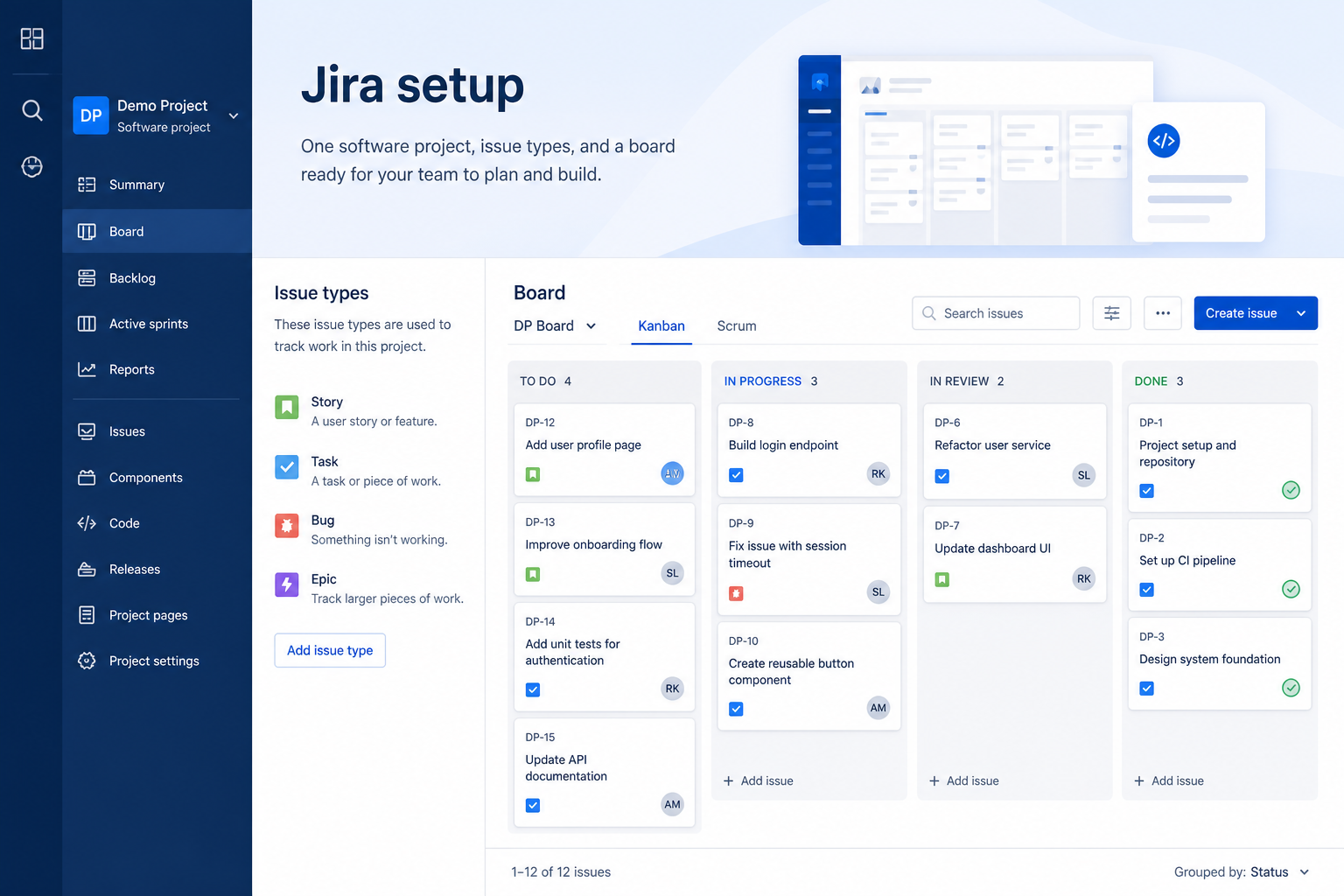
one project, one issue type set, and a board a developer can update without a Jira admin
Connect Slack / calendar / files
Prove a non-admin can run the loop
Write a one-page setup note
Jira day-zero setup media
Verified captures and vendor tutorials for configuring Jira before go-live — pipeline, contacts, and first workflows.
Official Jira setup walkthrough
Vendor tutorial for onboarding and configuration. It is not a SoftwareGlimpse rollout plan — use this guide for judgment.
This video is hosted on YouTube
This content is hosted by YouTube. The player loads only after you allow marketing cookies.
Official vendor tutorial
Demo: Project Management with Jira | Atlassian
How Jira presents the product in an official vendor video.
What this shows
✓Jira product surfaces as shown in the official vendor video
What Jira actually is — Jira is the default engineering / Agile work tracker for sprints, backlogs, workflows and DevOps integrations. Free covers up to 10 users; Standard ~list price annual; Premium ~list price; Enterprise custom. Best for software orgs — not a general marketing Wor…
Configure these first — Research lists task boards, timeline / Gantt, workload and resources, and automations and workflows as supported — that is your day-zero surface. Core loop: task boards, timeline / Gantt, workload and resources, and automations and workflows.
Do not treat it as every work-management job — Jira is engineering issue tracking and sprint delivery. It is not a substitute for a marketing work OS or a personal to-do list.
Start on the right package — Researched plans: Free, Standard, Premium, Enterprise. Never invent list prices here — confirm seats, hubs, and quote terms on /pricing/jira/.
Connect only what the loop needs — Research names Github, Gitlab, Slack, Confluence, and Zapier on the Jira side — confirm the connectors your work loop depends on.
AI comes after habits — Research lists AI assistant, AI summaries, AI automation, and AI recommendations for Jira. Research places AI assistance on Free, Standard, Premium, and Enterprise. Leave it off until the manual loop is boring.
A working Jira core loop beats a decorated empty workspace.
Jira must vs nice
Must-have
✓task boards
✓Named owners on live work
✓timeline / Gantt
✓Slack / calendar / files for the loop
Nice-to-have
•automations and workflows
•AI assistance
Jira day-zero connectors
Connect only what create one issue, move it across a board, and close a sprint or increment a release with a comment trail needs. Extra apps hide whether the core loop works.
Github
Gitlab
Slack
Confluence
Zapier
Verify each workflow in a trial — marketplace logos are not proof of fit.
Jira checklist
Bring these questions to every demo
Ask vendors to show the workflow live, not just describe it.
1Qualify Jira seats and hubsDay-one must-haves on the cheapest researched package.
2Name one workspace ownerBoards, users, and hygiene need ~2 hours a week.
3Configure one core loopone project, one issue type set, and a board a developer can update without a Jira admin
4Invite weekly users onlyRoles before a company-wide invite.
5Connect Slack / calendar / filesDocument other gaps instead of wiring everything.
6Complete non-admin proofa developer transitions an issue and a tech lead sees it on the board without admin rights
1. Start on the Jira package your must-haves need
Package choice decides whether Jira can even run engineering issue tracking and sprint delivery.
Right package
Must-haves sit on a researched tier you can accept.
Demo trap
The tour used timeline or automations that unlock later — write the qualifying hub before setup continues.
Over-invite
Inviting the whole Slack workspace inflates seats before the loop is proven.
Write five day-one jobs for engineering issue tracking and sprint delivery, map each to researched Jira packaging, and pick the cheapest tier that covers all five — including seats and guests. 1. List everyone who must log in weekly (not “the whole company”).
Match each day-one job to researched packaging. Plan-gated in research: workload and resources (Free, Standard, Premium, Enterprise); AI assistance (Free, Standard, Premium, Enterprise).
Pick the cheapest package that covers all five jobs.
Confirm guest/viewer rules so clients or execs are not accidentally billed as full seats. Our snapshot flags a trial on Standard and Premium without a published length — confirm the window on the Jira pricing page. Never invent list prices here — confirm seats, hubs, and quote terms on /pricing/jira/. Worked example: Northline Engineering (two squads, one shared backlog) lists the people who will update Jira every week before they invite lurkers. They refuse a demo tenant that is running on a higher hub than they will buy.
2. Create the workspace and name one owner
Name Responsible + Accountable for Jira before anyone builds a second board.
Owned
One person can change permissions without a Slack poll.
Committee
Three “admins” and no hygiene — pause invites.
Vendor-owned
If only the implementation partner can change a board, you do not own the workspace yet.
Name one workspace owner — not a committee — before you invite contributors. 1. Create the workspace with real timezone and company identity.
Give that owner ~2 hours a week for users, board hygiene, and permission changes.
Agree: new boards, automations, and seat upgrades go through that owner for 30 days.
Confirm current control labels in Jira admin / users settings — do not invent menu names. Worked example: Northline Engineering (two squads, one shared backlog) writes the two-hour Jira ownership into the week and blocks everyone else from installing marketplace apps until the core loop has a week of real use.
3. Configure one core loop — not five experiments
One trusted Jira board beats a folder of experiments nobody updates.
Loop live
Contributors update the same place managers look.
Shadow spreadsheet
If status still lives in Sheets, setup is not finished.
View sprawl
Six unused views hide the one ritual you need.
Configure one project, one issue type set, and a board a developer can update without a Jira admin. Research-supported surfaces include task boards, timeline / Gantt, workload and resources, and automations and workflows. 1. Stand up one live container of work (board, project, space, sheet, or cycle — whatever Jira actually uses).
Put real owners and due dates on at least five items.
Open a second view a manager can read without being the builder.
Refuse optional hubs until a non-admin can a developer transitions an issue and a tech lead sees it on the board without admin rights. Worked example: Northline Engineering (two squads, one shared backlog) treats a decorated empty workspace as failure. They will not turn on AI or extra automations until create one issue, move it across a board, and close a sprint or increment a release with a comment trail.
4. Invite weekly users, connect the loop, prove non-admin work
Exit Jira setup when a non-admin can finish the work loop unaided.
Proof pass
A non-admin completes the loop; a manager sees it without a screenshot.
Permission fail
Extend the trial and fix roles — do not buy more hubs.
Integration fail
The loop still depends on a side chat or sheet — reconnect or document the gap.
Our snapshot flags a trial on Standard and Premium without a published length — confirm the window on the Jira pricing page. 1. Invite only people who will update Jira this week.
Connect Slack, calendar, or files the loop depends on. Research names Github, Gitlab, Slack, Confluence, and Zapier on the Jira side — confirm the connectors your work loop depends on.
Success: a developer transitions an issue and a tech lead sees it on the board without admin rights.
Record a 10-minute walkthrough for stakeholders who skip hands-on time.
Write a one-page setup note: package, owner, loop, known gaps. Worked example: Northline Engineering (two squads, one shared backlog) is done only when a sceptic contributor finishes the walkthrough without an admin hovering. If that fails, they fix permissions before any go-live speech.
Common Jira setup mistakes
Configuring the demo hub you will not buy
If timeline, automations, or guest access only exist on a higher Jira package, setup on the demo is fiction. Qualify the hub first.
Inviting the whole company on day one
Empty seats do not create adoption. Invite weekly users, prove the loop, then expand.
Treating it as every PM job
Jira is engineering issue tracking and sprint delivery. Stretching it into a marketing work OS or a personal to-do list produces a messy workspace and a second tool anyway.
Automations before a weekly ritual
Automations amplify garbage. Get humans updating the board first.
Skipping non-admin proof
A polished admin tour is not evidence. If a contributor cannot finish the loop, you do not have a working system.
Frequently asked questions
When is setup actually done?
When a non-admin can a developer transitions an issue and a tech lead sees it on the board without admin rights on the package you will buy, and you have a named owner with weekly hours. A decorated workspace is not done.
Should we turn on every Jira hub on day one?
No. Extra hubs hide whether the core engineering issue tracking and sprint delivery loop works. Add views and automations after a week of real updates.
How long should day-zero take?
A focused team can finish in one working day if package, owner, and the first board are already decided. Multi-week “setup” usually means undecided packaging or missing ownership.
Do we need Slack connected on day one?
Only if the work loop depends on it. Research names Github, Gitlab, Slack, Confluence, and Zapier on the Jira side — confirm the connectors your work loop depends on. Document gaps instead of wiring a marketplace zoo.
Where do we confirm seats and hubs?
Never invent list prices here — confirm seats, hubs, and quote terms on /pricing/jira/.
Is Jira the same as monday sales CRM?
Jira is evaluated here as engineering issue tracking and sprint delivery. Do not assume a sibling product (CRM, ITSM, or docs) is the same workspace.